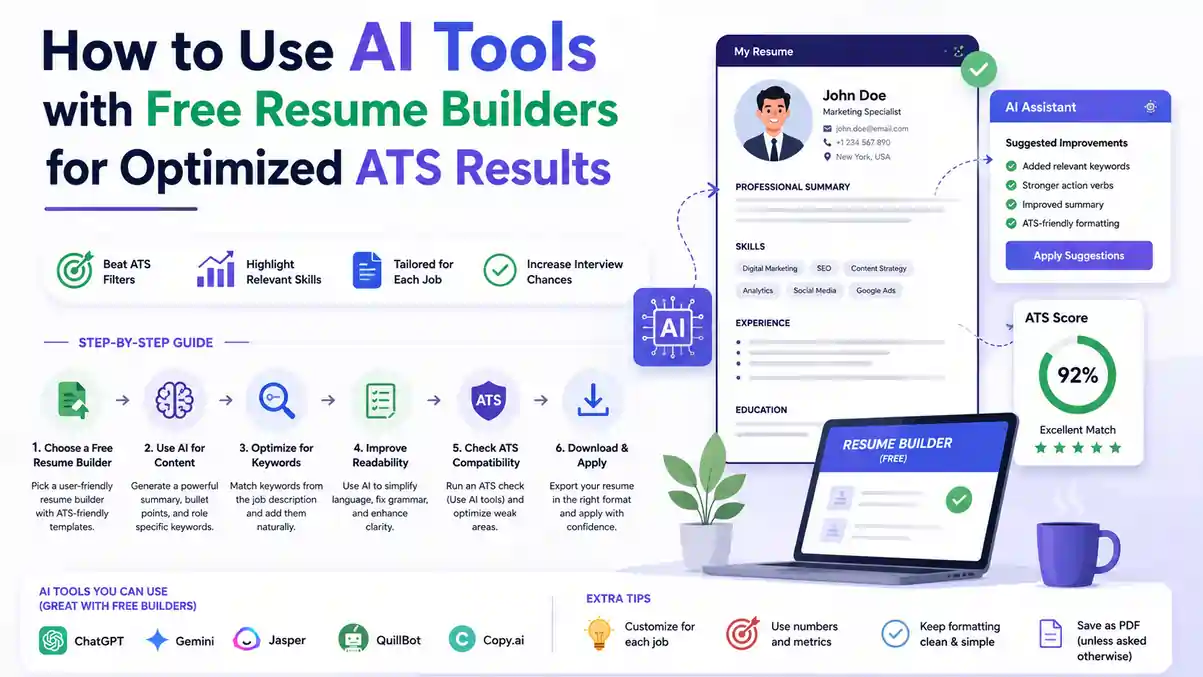
You don't need a flashy design to land interviews — you need the right words in the right places. If you're hunting for an AI Resume Builder For ATS that actually helps you pass the first screen, here's a practical way to pair smart tools with free builders and get consistent results. We'll focus on a simple, reusable workflow: parse the job ad, map the skills, draft clean content, and validate it against a checker. No gimmicks — just a tight process you can run in under an hour per application.
? Table of Contents
- How ATS Reads Your Resume (and Where It Breaks)
- Choosing the Right Tool Stack
- The Four-Stage Workflow, Step by Step
- Optimize Keywords, Structure, and Scoring
- Tailor by Role Without Starting Over
- Free vs Paid: What Actually Changes
- Fast Fixes and Common Mistakes
- Why an AI Resume Builder For ATS Beats Manual Editing
- The 60-Minute Tune-Up Checklist
- FAQs: AI Resume Writing Tools & Workflow
- Conclusion
1. How ATS Reads Your Resume (and Where It Breaks)
Applicant Tracking Systems parse text into fields like name, titles, dates, employers, and skills. They struggle with columns, tables, text boxes, graphics, and vague section labels. Keep formatting simple so the parser doesn't have to guess what belongs where.
- Use standard headers like Experience, Education, Skills, Certifications
- Avoid images, icons, charts, and decorative lines
- Stick to one column, left-aligned content, and common fonts
- Save as .docx or a text-friendly PDF if the application allows it
If you prefer templates already tuned for parsing, an ATS Resume Builder keeps sections standard and fonts readable while avoiding table-based layouts that confuse most parsers.
2. Choosing the Right Tool Stack
Pick a Resume Builder With AI that exports clean .docx and gives you plain, single-column templates with standard headings. You want editing control, not a locked design that hides text inside shapes you can't touch.
Collect the right inputs first
Save 3-5 target job posts and paste them into your favorite AI Resume Writing Tools to surface recurring hard skills, certifications, tools, and action verbs the role expects. Patterns across multiple postings for the same role type are more reliable signals than any single job ad.
3. The Four-Stage Workflow, Step by Step
This is the core process — reusable for every application, regardless of which tools you use:
1 Parse the Job Ad
Copy the full job description into a document. Highlight the exact job title, the 8-12 recurring skills or tools, and any certifications explicitly required. This becomes your keyword source of truth for this specific application.
2 Map the Skills
Match each highlighted skill against your actual experience. Only include skills you genuinely have — matching keywords you can't back up in an interview causes more harm than a slightly lower match score.
3 Draft Clean Content
Start with a plain template, then use an AI Resume Generator to produce a first draft that matches the job's language without copying it verbatim. Run a second pass focused on AI Resume Optimization — tightening verbs, adding measurable outcomes, and surfacing the top 10-12 skills that appeared across your saved postings.
4 Validate Against a Checker
Before you apply, paste your resume and the job ad into a trusted Resume ATS Checker to see the match rate, missing keywords, and any parsing issues — then fix what it flags before submission.
4. Optimize Keywords, Structure, and Scoring
Before you apply, run the validation pass properly. A quick checklist for what to fix once your checker flags issues:
- Rename sections to standard labels if the checker flags them as unrecognized
- Replace text boxes, tables, and columns with plain paragraphs
- Ensure your phone, email, and location live in the document body, not headers/footers
- Cover both acronyms and their long forms when both appear in the posting (e.g., "SEO" and "Search Engine Optimization")
Aim for an ATS Friendly Resume that reads cleanly to software and still looks professional to a hiring manager skimming it on a laptop screen a few minutes later.
Your resume should include both forms at least once each
so the parser catches the match regardless of which term it's scanning for
5. Tailor by Role and Industry Without Starting Over
Create a solid base resume, then ask your AI Resume Builder For ATS to generate role-specific versions by updating just three things: the headline, the core skills list, and the top bullet under your most recent job. You don't need to rebuild the whole document for every application.
If budget is tight, a Free AI Resume Builder still covers the essentials: keyword placement, standard headings, and clean .docx export. Save the paid upgrade for when you're applying at high volume or targeting a senior role that demands deeper tailoring.
6. Free vs Paid: What Actually Changes
| Task | Free AI Resume Builder | Paid Tool Advantage |
|---|---|---|
| Basic draft generation | Covers this well | Faster iteration, more templates |
| Single-job tailoring | Sufficient | Marginal benefit |
| Bulk tailoring across many roles | Manual, slower | Often automated |
| Detailed keyword-gap scoring | Limited | More precise, live scoring |
| Clean .docx export | Usually included | Same, rarely a differentiator |
If you're comparing tools directly, test outputs from the Best Free Resume Builder you can find against a paid option by checking parsing accuracy and match scores on the exact same job posting. The difference is often smaller than the marketing suggests.
7. Fast Fixes and Common Mistakes
Do a 60-minute tune-up before submitting: add metrics to the top three bullets in your most recent job, mirror the job title once near the top of your summary, and trim fluff so each bullet reads as action + impact.
- Don't use two columns, text boxes, or images — parsers drop or scramble them
- Skip headshots and ornate icons; they add visual weight without adding parseable information
- Keep dates aligned in a consistent format like MM/YYYY–MM/YYYY throughout
- Don't over-list older, less relevant experience — summarize it instead of detailing it
8. Why an AI Resume Builder For ATS Beats Manual Editing
It accelerates the boring, repetitive parts — keyword mapping, consistent phrasing, and reformatting for each application — so you can spend your actual time adding real numbers and stronger achievements. Manual editing tends to skip the validation step entirely because it's tedious; a good tool stack makes that step nearly automatic.
The goal isn't to let AI write your whole story. It's to let AI handle the mechanical parts of matching a posting's language, so your energy goes toward the parts only you can write: specific outcomes, real numbers, and genuine context.
9. The 60-Minute Tune-Up Checklist
- Job ad parsed — 8-12 keywords and the exact job title identified
- Skills mapped honestly against your real experience
- Draft generated with single-column, standard-header formatting
- Top 3 bullets in most recent role include real numbers
- Job title mirrored once near the top of your summary
- Acronyms and long forms both covered where the posting uses both
- Resume run through an ATS checker with flagged issues fixed
- File exported as .docx first, checked, then converted to PDF if needed
- File named clearly: Lastname-RoleTarget-Resume.docx
FAQs: AI Resume Writing Tools & ATS Workflow
Conclusion: Pair Good Inputs With a Disciplined Workflow
Pair good inputs with a disciplined process, and you'll ship stronger applications in less time. Use the four-stage workflow above — parse, map, draft, validate — to create a clean base resume, tailor it quickly for each role, and confirm it with a checker before you hit submit.
Ready to try this today? Spin up a simple template, run a focused pass with your AI Resume Builder For ATS, and aim for a higher match score on your very next application.
Build Your Free ATS Resume on ResumeEra →{ "@context": "https://schema.org", "@type": "Article", "headline": "AI Resume Builder For ATS: The 60-Minute Workflow to Pass the First Screen", "description": "A practical, tool-agnostic workflow for using an AI Resume Builder For ATS: parse the job ad, map skills, draft clean content, and validate with a checker.", "author": { "@type": "Organization", "name": "ResumeEra", "url": "https://resumeera.xyz" }, "publisher": { "@type": "Organization", "name": "ResumeEra", "url": "https://resumeera.xyz" }, "datePublished": "2026-07-18", "dateModified": "2026-07-18", "mainEntityOfPage": "https://resumeera.xyz/JobPost/blog/ai-resume-writing-tools-workflow-for-ats-12" } { "@context": "https://schema.org", "@type": "FAQPage", "mainEntity": [ { "@type": "Question", "name": "Can I really complete this workflow in under an hour?", "acceptedAnswer": { "@type": "Answer", "text": "Yes, once you've done it two or three times. After building your base resume, tailoring for a new posting fits in 45-60 focused minutes." } }, { "@type": "Question", "name": "Should I use one tool for everything, or separate tools for drafting and checking?", "acceptedAnswer": { "@type": "Answer", "text": "Separate tools generally work better. Use a drafting tool for formatting and a dedicated ATS checker for scoring and gap analysis against a specific job description." } }, { "@type": "Question", "name": "Is it dishonest to add keywords from the job posting that I don't naturally use?", "acceptedAnswer": { "@type": "Answer", "text": "Only include a keyword if you genuinely have that skill. The goal is matching the employer's phrasing to your real experience, not inventing skills." } }, { "@type": "Question", "name": "Why does my resume look fine to me but score poorly on an ATS checker?", "acceptedAnswer": { "@type": "Answer", "text": "Text inside tables, columns, or icons can look normal to a human but be invisible or scrambled to an ATS parser. Always validate with a checker." } }, { "@type": "Question", "name": "Do I need a paid AI Resume Builder For ATS, or is free enough?", "acceptedAnswer": { "@type": "Answer", "text": "A free AI resume builder covers the essentials for most job seekers. Paid tools add value for high-volume applying, senior roles, or bulk tailoring." } } ] }
