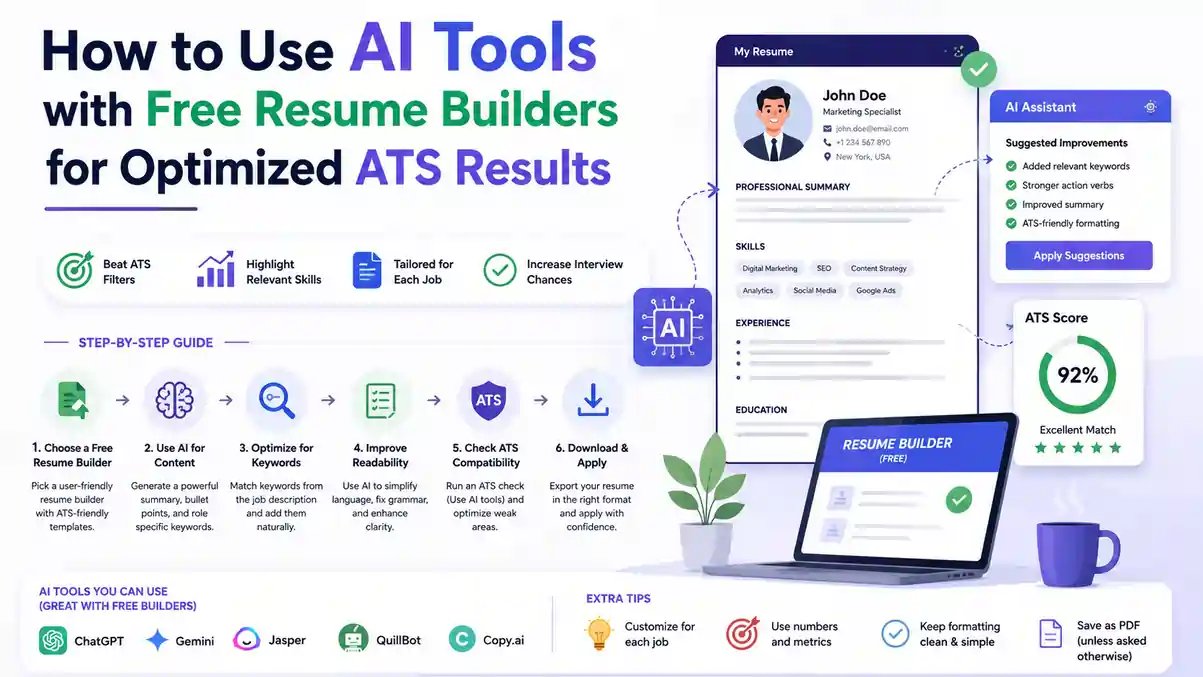
Your resume gets maybe 10 seconds with a recruiter — if it even makes it past the software filter first. Pairing an AI Resume Builder For ATS with smart, free tools helps you write to the job, keep clean formatting, and clear that first gate without guesswork.
? Table of Contents
- How ATS Works — And Why AI Pairing Helps
- What ATS Actually Parses From Your Resume
- Choosing an AI Resume Builder For ATS: Free Tools That Work
- Must-Have Features in an AI Resume Builder For ATS
- A Simple Workflow: AI + Builder = Job-Ready Resume
- Score Higher With Smart Formatting and Checks
- Free vs Paid AI Resume Builders For ATS
- Picking and Using Builders the Right Way
- Frequently Asked Questions
- Conclusion
How ATS Works — And Why AI Pairing Helps
Most Applicant Tracking Systems (ATS) parse plain text to find skills, job titles, employers, dates, and proof of impact. They reward clarity and consistency over creativity. Fancy design elements often backfire: tables can scramble field order, text inside shapes or icons gets ignored entirely, and split two-column layouts may read completely out of sequence when the software converts your file to plain text.
This is exactly where an AI Resume Builder For ATS earns its place in your job search toolkit. If you're targeting multiple roles at once, a good AI Resume Builder For ATS can accelerate tailoring while keeping the underlying structure consistent, so scanners pick up the right details every single time — regardless of which company's tracking software is reading your file.
What ATS Actually Parses From Your Resume
Think in simple, structured sections: Summary, Skills, Experience, and Education. Use clear job titles, month-year dates, and bullet points backed by numbers. Keep section headings standard — "Work Experience" rather than "My Journey" — and avoid headers/footers, since many parsers skip content placed there.
- Standard section names (Summary, Skills, Experience, Education)
- Consistent month-year date formatting throughout
- Job titles that match how the industry actually labels the role
- Bullet points, not paragraphs, for experience entries
- No text inside tables, images, or graphics
For a deeper breakdown of every section a recruiter and an ATS both expect to see, check this complete guide to essential resume sections, and pair it with this beginner-friendly ATS format guide for formatting basics.
Choosing an AI Resume Builder For ATS: Free Tools That Actually Work
A solid starting point is a Free AI Resume Builder that offers clean, single-column templates without heavy graphics, plus quick export to DOCX and PDF. Not every tool that calls itself an AI Resume Builder For ATS actually tests its templates against real screening software — so verification matters more than marketing claims.
If you switch roles often, look for an ATS Resume Builder that saves multiple versions and lets you swap skills and bullets against each job description fast. This version-control habit alone can cut your per-application editing time by more than half, because you're adapting an existing tailored draft instead of rewriting from a blank page.
Must-Have Features in an AI Resume Builder For ATS
- Single-column layout with standard fonts (Arial, Calibri, Times New Roman)
- Editable section headings and easy drag-and-drop reordering
- Keyword guidance or suggestions tied directly to a pasted job post
- DOCX export plus a basic PDF that keeps live, selectable text
- Bullet formatting that stays consistent across the entire file
Before committing to any single AI Resume Builder For ATS long-term, run a free ATS resume checker on a sample export to confirm the parsing actually works the way the tool claims.
A Simple Workflow: AI + Builder = Job-Ready Resume
Start by pasting the target job post into your tool and running an AI Resume Optimization pass to surface the hard skills, tools, and repeated action verbs the employer cares about most. This single step usually reveals five to ten keywords you'd otherwise miss just reading the post once.
Draft or refresh bullets with an AI Resume Generator, then tighten them yourself to make sure the claims, numbers, and wording still sound like you — not like generic filler text. An AI Resume Builder For ATS should speed up drafting, never replace your judgment about what's actually true on your resume.
Step-by-Step to a Clean Draft
- Collect inputs: your best projects, metrics, tech stack, and the full job post text.
- Map keywords to roles: tie each must-have skill to a specific job entry where you actually used it.
- Write impact bullets: action verb + task + measurable result, every time.
- Front-load relevance: most recent, most relevant achievements go first in each role.
- Export to DOCX, proofread, then create a PDF only after the DOCX version passes your own read-through.
Strong: "Grew Instagram engagement 34% in 6 months by planning a weekly content calendar across 3 platforms."
For phrasing variety and editing support, use AI Resume Writing Tools to split long sentences, swap weak verbs, and remove buzzwords that don't say anything measurable. A related read: how to tailor your resume to a job description, which walks through this same mapping process in more depth.
Score Higher With Smart Formatting and Checks
Your goal is an ATS Friendly Resume: one column, left-aligned text, 10–12pt font, standard section labels, and bullets that start with strong verbs and include numbers wherever possible. Every AI Resume Builder For ATS worth using defaults to this layout automatically, so you don't have to fight the template.
Before you apply, pass your file through a Resume ATS Checker to catch missing keywords, inconsistent dates, or files that might be unreadable by certain parsers. This single five-minute check catches most of the silent rejections that never even get a reply.
Quick Checks Before You Submit
| Check | What to Look For |
|---|---|
| File type | Prefer DOCX for safety; use PDF only if the checker confirms text is selectable |
| Design elements | No tables, text boxes, images, or icons carrying real content |
| Job title match | Mirror the posting's exact title if your experience genuinely supports it |
| Keyword coverage | Key skills appear in both your Skills section and Experience bullets |
| Quantified impact | At least one number per recent role (%, ₹, time saved, team size) |
For a full checklist you can run every single time before hitting submit, see this resume checklist guide and the industry-specific breakdown in resume keywords that help you pass ATS in 2026.
Free vs Paid AI Resume Builders For ATS
| Feature | Free AI Resume Builder For ATS | Paid Alternative |
|---|---|---|
| Single-column ATS template | ✓ Yes | ✓ Yes |
| DOCX + PDF export | ✓ Usually free | ✓ Yes |
| Multiple saved versions | ✓ On good platforms | ✓ Yes |
| Keyword suggestions | ✓ Basic to strong | ✓ Advanced |
| Watermark-free download | ✗ On many tools | ✓ Yes |
| Monthly cost | ₹0 | Recurring fee |
Most job seekers don't need a paid subscription to get a properly parsing resume. A well-built free AI Resume Builder For ATS covers every checklist item above — the gap only shows up in extras like premium templates, not in actual ATS compatibility.
Picking and Using Builders the Right Way
If you change industries or seniority levels often, choose a Resume Builder With AI that stores role-specific versions so you can tailor quickly without rewriting from scratch each time. This matters more than most people expect once you're applying to 15-20 roles a month.
When comparing options, test the Best Free Resume Builder by exporting a sample, scanning it through a checker, and confirming the text order, headings, and bullets read exactly as intended — not scrambled by a hidden table or column break. See how different platforms stack up in this free vs paid resume builder comparison.
Frequently Asked Questions
The Bottom Line
Blend smart tools with judgment: use an AI Resume Builder For ATS for speed, keep a clean single-column layout, and tailor bullets to the job's exact language. Always verify with a quick scan and a human read before you hit submit.
Ready to try this workflow? Build a clean draft, run a check, and iterate once more before you send.
Build Your Free ATS Resume Now