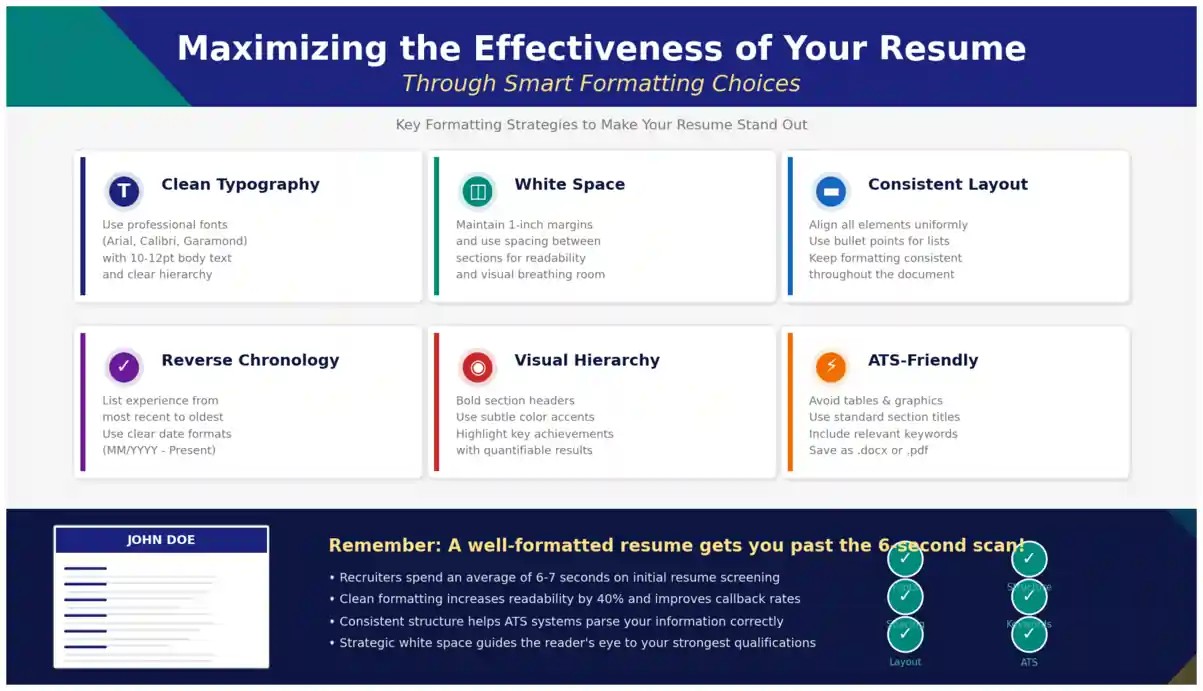
The Complete 2026 Guide to ATS-Friendly Layouts, Recruiter-Approved Structure, and Results-Driven Design
Recruiters skim in seconds, not minutes. If your resume is hard to scan, they will move on. That is why smart resume formatting tips matter so much: the right choices make achievements pop and keep the focus on results, not decoration.
You do not need a flashy template to stand out. You need clear structure, consistent styling, and choices that work for both humans and applicant tracking systems. Let us make that easy.
In 2026, the job market is more competitive than ever. With 97.8% of Fortune 500 companies using applicant tracking systems (ATS) and the average recruiter spending just 11.2 seconds on the initial resume scan, your formatting decisions can make or break your application before a single word is truly read. The difference between a callback and silence often comes down to how well your resume is structured—not just what it says.
This comprehensive guide walks you through every critical formatting decision: from choosing the right resume format and building a clean visual hierarchy to creating an ATS-friendly layout that still impresses human recruiters. Whether you are a fresh graduate, a career changer, or a seasoned professional, these smart resume formatting tips will help you maximize every inch of your resume.
? Table of Contents
- Why Formatting Decides If Your Resume Gets Read
- Pick the Right Resume Format for Your Story
- Build a Clean Structure That Guides the Eye
- Design That Passes ATS and Looks Good to Humans
- Smart Resume Formatting Tips You Can Apply Today
- Formatting Specs Recruiters Expect in 2026
- Frequently Asked Questions
- Conclusion & Next Steps
Why Formatting Decides If Your Resume Gets Read
Good resume formatting determines how quickly a reviewer can find job titles, employers, dates, and impact. It is the difference between a fast yes and a polite pass. Design is not art here; it is information delivery. Your layout must build a fast visual path: name and title at the top, crisp section labels, and bullets that show measurable wins.
Think of your resume as a landing page. In web design, users abandon pages that do not communicate value within seconds. Recruiters behave the same way. Eye-tracking studies consistently show that recruiters anchor on the top third of the page first. If your professional summary, most relevant title, and standout achievements are buried under clutter, you have already lost the battle.
Moreover, formatting is not just about human readability. 75% of resumes are rejected by an ATS before they ever reach a human reviewer. These systems parse your document linearly—top to bottom, left to right. Complex layouts with columns, tables, text boxes, or graphics can scramble your information, causing the ATS to misread or completely skip critical details. A well-formatted resume gets you past both the bot and the 6-second human scan.
Pick the Right Resume Format for Your Story
Your resume format should match how you want your experience to be understood. If your path is steady and relevant, let your most recent roles lead. The three primary formats each serve different career situations:
1. Reverse-Chronological Format
This is the default for most professionals because it shows growth and context. It lists your work history starting with the most recent position and working backward. Recruiters prefer this format because it is familiar, easy to scan, and ATS-friendly. If you have a steady career trajectory with no major gaps, this is your best choice. Learn more in our dedicated guide to the chronological resume format.
2. Functional Format
A functional resume focuses on skills rather than work history, grouping experience by skill area instead of listing roles chronologically. This option can help career changers or those with employment gaps, but it often feels thin without dates and can confuse ATS systems that expect standard section structures. Explore when to use the functional resume format effectively.
3. Combination (Hybrid) Format
The hybrid format blends the two by leading with skills and a short summary, then proving each skill with recent achievements. This is the best-performing layout in 2026 testing, parsing at 95–99% accuracy across major platforms like Workday, Greenhouse, Lever, Taleo, and iCIMS. It is ideal for professionals with strong skills and relevant experience who want to highlight strengths upfront. Read our full guide on the combination resume format.
| Format | Best For | ATS-Friendly | Recruiter Preference |
|---|---|---|---|
| Reverse-Chronological | Steady career, clear progression | ✅ Excellent | ✅ High |
| Functional | Career changers, employment gaps | ⚠️ Moderate | ⚠️ Low |
| Combination | Skilled professionals, role switchers | ✅ Excellent | ✅ High |
Build a Clean Structure That Guides the Eye
A professional resume layout uses clear headings, balanced spacing, and predictable placement so the reader never has to hunt for the next detail. Clear resume structure means a simple top-to-bottom flow:
- Contact Information — Name, phone, email, LinkedIn, location (city, state)
- Professional Summary — 2–3 lines of your strongest value proposition
- Core Skills — Grouped by category (Technical, Tools, Languages)
- Work Experience — Reverse-chronological with bullet achievements
- Education — Degree, institution, graduation date
- Optional Extras — Certifications, Projects, Awards, Publications
? Pro Tip: The Top-Third Rule
The top third of your resume is prime real estate. Place your most compelling information here: a tailored professional summary, your target job title, and 1–2 quantified achievements. Recruiters spend the majority of their initial scan in this zone. Make every line earn its space.
Follow resume formatting best practices by keeping color subtle, using bold for emphasis sparingly, and aligning everything to a tidy grid so nothing drifts. Consistency is key: if your first job title is bold and 14pt, every job title must be bold and 14pt. If your first date is right-aligned, all dates must be right-aligned. These micro-decisions signal professionalism and attention to detail.
Design That Passes ATS and Looks Good to Humans
An ATS resume format avoids elements that parsing software struggles with, such as text boxes, graphics, tables, headers, and footers. One column is safer than two, especially for online applications. But being ATS-safe does not mean being boring—you can still create a visually appealing document that impresses human recruiters.
ATS-Safe Design Moves
- Use standard headings like Experience, Education, and Skills so systems map your content correctly. Creative labels like "My Career Journey" may confuse parsers.
- Stick to simple bullets and plain text; avoid icons and shapes that turn into garble when parsed.
- Submit a .docx when required; send a PDF only if the system or recruiter confirms it is OK. A text-based PDF preserves layout and is accepted by most modern parsers.
- Write role titles that match the posting where accurate, and mirror key keywords naturally throughout your work experience section.
⚠️ Common ATS Traps to Avoid
Independent testing found that roughly 72% of popular Canva templates fail basic parsing because of text boxes, columns, icons, and graphics. The 2-minute test: Select all text in your resume (Ctrl+A), copy, and paste into Notepad. If your name, titles, and skills come out scrambled, that is exactly what the ATS sees.
Modern Design Tips for Human Readers
A modern resume format stays minimal: a single accent color for headings, strong left alignment, and no headshots unless your market expects them. Thoughtful resume design tips include subtle use of bold for numbers, tight but readable spacing, and short sections that break up walls of text.
Color psychology matters too. Navy blue conveys trust and professionalism. Teal suggests creativity balanced with reliability. A touch of gold or amber can draw attention to key metrics. But never use more than two colors, and always ensure sufficient contrast for accessibility.
Smart Resume Formatting Tips You Can Apply Today
The best resume formatting tips are the ones you can act on fast: set styles once, keep bullets tight, and make every line earn its space. Here are actionable strategies you can implement in your next 20-minute editing session:
Quick Wins for Immediate Impact
- Trim weak bullets; keep 4–6 bullets for your most recent roles and 2–4 for older ones. Every bullet must demonstrate value.
- Front-load impact: start bullets with the result, then explain how you achieved it. Example: "Increased Q3 revenue by 34% by restructuring the client onboarding funnel" beats "Responsible for onboarding new clients."
- Quantify relentlessly: % change, time saved, revenue added, defects reduced. Numbers are the fastest way to communicate impact to both ATS and recruiters.
- Group skills into clusters like Data, Tools, or Languages to prevent long comma lists. This improves both ATS parsing and human scannability. See our guide on key skills for resume for examples.
- Mirror 4–6 keywords from the posting in your summary and top bullets without stuffing. Natural integration beats forced repetition.
- Standardize dates, dashes, and punctuation so everything feels consistent. Use MMM YYYY or MM/YYYY throughout—never mix formats.
Tailor Your Top Third for Each Role
Practical resume formatting for job applications means tailoring your top third for each role: adjust the title line, tweak your summary, and swap in the most relevant bullets. This 5-minute customization can dramatically improve your match score in ATS and catch the recruiter's eye faster. Learn how to tailor your resume for every job application with our step-by-step guide.
? The 20-Minute Resume Edit Checklist
- Update your professional summary to match the target role (3 min)
- Swap in the most relevant 3–4 bullet points from your experience (5 min)
- Rearrange your skills section to lead with job-specific competencies (3 min)
- Check that all dates use the same format (2 min)
- Run the plain-text test for ATS compatibility (2 min)
- Save with a professional filename: FirstName-LastName-Role.pdf (1 min)
Formatting Specs Recruiters Expect in 2026
Recruiters and ATS systems have clear preferences. Meeting these specs signals that you understand professional standards and respect the reader's time:
| Element | Recommended Spec | Why It Matters |
|---|---|---|
| Fonts | Calibri, Arial, Helvetica, Cambria, Garamond | Universal readability; ATS-safe rendering |
| Body Size | 11–12 pt | Readable without crowding the page |
| Headings | 14–16 pt, bold | Clear visual hierarchy for scanning |
| Margins | 0.5–1 inch on all sides | Prevents text cutoff; maintains white space |
| Line Spacing | 1.0–1.15 | Compact clarity without cramping |
| Bullets | 1–2 lines each, strong verbs, end with metrics | Maximum impact per line; ATS-friendly |
| Dates | MMM YYYY or MM/YYYY, right-aligned | Quick scanning; consistent parsing |
| File Name | firstname-lastname-role.pdf/.docx | Professional; searchable in recruiter systems |
| Page Count | 1 page (2 if 10+ years experience) | Respects recruiter time; forces conciseness |
Your contact information should never be placed in headers or footers—ATS systems often skip these regions entirely. Keep everything in the document body, plain text, and clearly labeled.
❓ Frequently Asked Questions
What is the best resume format for ATS in 2026?
The single-column reverse-chronological format remains the gold standard for ATS compatibility in 2026. It reads linearly from top to bottom, uses standard section headings, and avoids columns, tables, or text boxes that confuse parsers. For professionals with diverse skills, the combination format also performs well if kept in a single column. Always test your resume by copying all text into Notepad—if it reads in the correct order, your format is likely ATS-safe.
Should I use a PDF or Word document for my resume?
Both formats work, but context matters. A text-based PDF preserves your layout and is accepted by most modern ATS platforms (53% of hiring managers prefer it). However, a .docx file is the safest fallback for older systems and is preferred by 43% of recruiters. When in doubt, follow the employer's instructions. If none are given, submit a .docx for maximum compatibility. Never submit image files (PNG/JPG) as ATS cannot extract text from them.
How do I make my resume scannable in 6 seconds?
Recruiters scan in an F-pattern: top-left across, then down the left margin. Place your name, target title, and a 2-line professional summary at the top. Use bold for job titles and company names. Keep bullets to 1–2 lines starting with strong action verbs and ending with numbers. Right-align dates so the timeline is instantly traceable. Use plenty of white space—crowded resumes trigger immediate rejection.
Can I use color and design elements on my resume?
Yes, but sparingly. Stick to one accent color (navy, teal, or dark green work well) for section headings only. Avoid background colors, graphics, skill bars, icons, and photos—these break ATS parsing and can introduce bias. A clean, minimal design with strategic bold text and consistent alignment looks more professional than a flashy template. Remember: design should serve content, not distract from it.
How many bullet points should each job have on my resume?
Quality over quantity. Include 4–6 bullets for your most recent and relevant roles, 2–4 for older positions, and 1–2 for roles over 10 years old. Each bullet should demonstrate a specific achievement with a measurable outcome. If a bullet does not include a number, a percentage, or a clear result, rewrite it or remove it. This discipline keeps your resume concise and impact-focused.
Conclusion: Clarity and Proof Win Every Time
You do not need perfect prose; you need clarity and proof. Keep fonts simple, structure consistent, and numbers front and center. Those are the smart resume formatting tips that win quick scans and land interviews.
In 2026, your resume must pass two gates: the ATS parser and the human recruiter. A single-column layout with standard headings, clean typography, and quantified achievements satisfies both. Avoid the temptation to use flashy templates that sacrifice readability for aesthetics. Instead, invest that energy into tailoring your content, mirroring job-specific keywords, and front-loading your most impressive results.
Ready to put this into practice? Grab a clean template, run a 20-minute edit using the checklist above, and send a test upload through an ATS checker. For templates and examples that follow these rules, explore ResumeEra and start refining today. Your next opportunity is waiting—make sure your resume opens the door.
? Build Your ATS-Friendly Resume in Minutes
Use ResumeEra's free resume builder to create a professionally formatted, ATS-optimized resume with zero design guesswork. No signup required.
Create My Free Resume →? Related Reading
- ATS-Friendly Resume Guide 2026 — Complete walkthrough for beating the bots
- How to Write a Resume in 2026 — From blank page to finished draft
- Resume Format 2026 — Latest trends and templates
- 10 Essential Resume Sections in 2026 — What to include and what to skip
- Resume Achievements — How to quantify your impact effectively
- 5 Ways to Get Your Resume Past ATS in 2026 — Proven strategies that work
