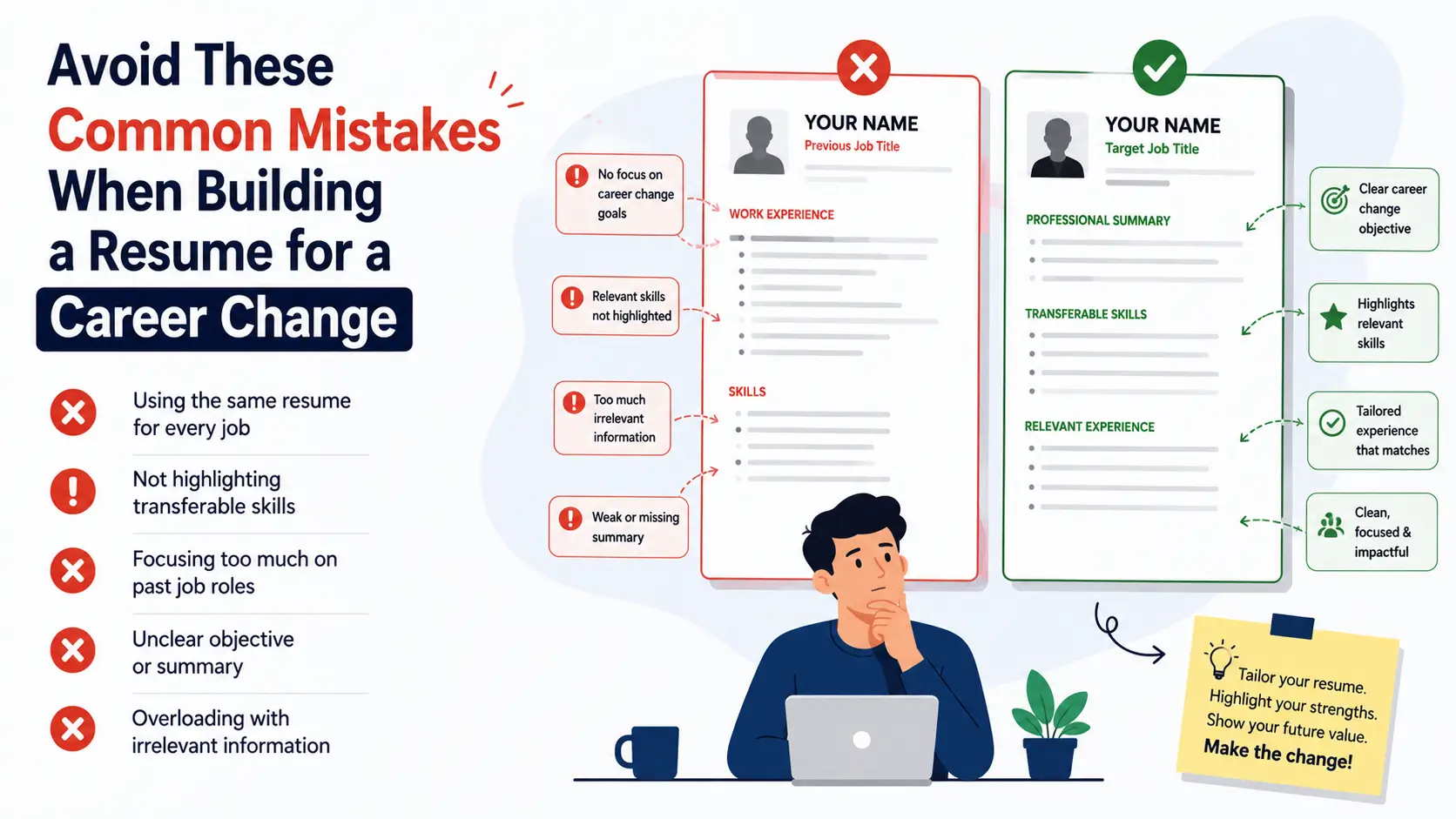
Hiring managers don’t reject career changers because they’re risky.
They reject them because the resume never connects the dots.
If your document reads like a life story instead of a clear plan for the target job, it’s working against you. Done right, a Career Transition Resume makes that leap feel obvious and low-risk.
You can avoid most pitfalls with a few focused moves: pick the right structure, translate past wins into the new language, and show proof you can do the work right now. This guide cuts the noise and shows exactly what works in 2026.
Table of Contents
- The Costly Traps Career Changers Fall Into
- Career Transition Resumes: What Really Works Today
- Proof Points That Actually Matter
- Pick the Right Structure and Section Order
- Best Resume Formats by Scenario
- How to Translate Experience Into the New Role
- Skills-Mapping Mini Workflow
- Beat ATS Without Sounding Like a Robot
- Career Transition Resumes: Quick Checklist
- Real-World Examples of Strong Career Change Bullets
- Frequently Asked Questions
- Conclusion & Next Steps
1. The Costly Traps Career Changers Fall Into
A common flaw in a Resume for a Career Change is leading with old job duties instead of relevant impact. This buries your fit below outdated tasks that have nothing to do with the new role.
Another frequent miss on a Career Change Resume is vague bullets such as “Responsible for projects” or “Handled team activities.” These lack metrics, tools, stakeholders, or outcomes — giving hiring teams nothing concrete to trust.
Other expensive mistakes include:
- Using a pure chronological format that highlights irrelevant recent jobs first
- Ignoring the exact language of the target job description
- Overloading the resume with every past responsibility
- Using creative designs, tables, or columns that break ATS parsing
If you want to avoid these, start by studying proven structures in our detailed guide on Career Change Resume Format.
2. Career Transition Resumes: What Really Works Today
Study strong Career Change Resume Examples, but never copy their fluff. Borrow the structure and replace every generic phrase with proof that you can deliver value in the new role.
Before writing a single line, map the job description into a skills checklist. Then outline How to Write a Career Change Resume that mirrors those priorities in your summary, skills section, and most recent roles.
In 2026, the most successful career transition resumes do three things extremely well:
- They speak the language of the target industry
- They surface transferable impact within the first half of the first page
- They remain completely ATS-friendly
For a deeper look at transferable skills that hiring managers actually value, see our guide on Transferable Skills on a Resume.
3. Proof Points That Actually Matter
Choose the Best Resume Format for Career Change by asking one simple question:
“What gets me to evidence of fit the fastest?”
If a hybrid layout puts relevant skills and quantified wins at the top, use it. Recruiters spend an average of 6–8 seconds on the first scan. Make those seconds count.
Strong proof points include:
- Metrics (%, ₹, numbers of people, time saved, revenue influenced)
- Tools and technologies used in the target field
- Cross-functional collaboration that mirrors the new role
- Projects (even side projects or volunteer work) that demonstrate current capability
4. Pick the Right Structure and Section Order
An ATS-Friendly Career Change Resume keeps design simple: clear headings, standard fonts, and no images, text boxes, or multi-column layouts that can scramble parsing.
Recommended order for most career changers:
- Contact Information
- Professional Summary (3–4 lines focused on the target role)
- Core Skills / Technical Skills (keyword-rich)
- Relevant Experience (or Professional Experience)
- Projects (if they strengthen the case)
- Education & Certifications
This order helps a Resume for Changing Careers surface immediate fit before deeper history. For more on clean, parseable layouts, check our ATS-Friendly Resume Format for Beginners.
5. Best Resume Formats by Scenario
| Situation | Recommended Format | Why It Works |
|---|---|---|
| Most career pivots | Hybrid / Combination | Skills + selected experience up front |
| Recent roles already somewhat aligned | Chronological | Shows progression cleanly |
| Heavy career switch + strong projects | Hybrid + Projects section | Proves current capability |
| Returning after a long break | Functional (use carefully) | Focuses on skills over dates |
Keep section names standard so both systems and humans recognize them instantly. You can explore each format in detail here:
- Combination Resume Format
- Chronological Resume Format 2026
- Functional Resume Format
- Resume Formats Overview
6. How to Translate Experience Into the New Role
Lead with outcomes tied to the target role, then briefly show how you achieved them. Practical, specific lines beat adjectives every time. This is the core of solid Resume Tips for Career Change.
Responsible for managing social media accounts and creating content.
Grew organic engagement 140% in 8 months by redesigning content strategy and introducing data-driven posting schedules — skills directly transferable to digital marketing roles.
Always ask: “Would a hiring manager in the new field immediately understand the value of this achievement?”
7. Skills-Mapping Mini Workflow
Follow this simple process every time:
- Open 3–5 target job descriptions.
- Create two columns: Left = Required skills & keywords | Right = Your evidence
- Select the strongest 1–2 pieces of proof for each key requirement.
- Turn those into achievement-oriented bullets.
- Place the highest-priority matches in your summary and skills section.
This method turns a generic resume into a targeted Career Transition Resume that feels custom-built.
8. Beat ATS Without Sounding Like a Robot
Don’t chase every keyword. Focus on the must-haves that appear across multiple postings. This also prevents the biggest Resume Mistakes to Avoid — keyword stuffing and awkward, unnatural phrasing.
Best practices in 2026:
- Mirror exact phrasing only when it is accurate
- Spell out acronyms on first use (e.g., Customer Relationship Management (CRM))
- Use standard section headings
- Save as .docx unless PDF is explicitly requested
- Keep design single-column and simple
For a complete ATS optimization walkthrough, read How to Build an ATS-Friendly Resume That Passes the Bots.
9. Career Transition Resumes: Quick Checklist
- Extract 8–12 core requirements from 3–5 target postings and mirror exact phrasing only when accurate.
- Keep design simple: standard section headings, no tables/columns, minimal symbols.
- Spell out acronyms on first use, then use the short form.
- Prefer .docx unless the employer specifically asks for PDF.
- Write impact bullets with: Strong verb + What you did + Outcome (numbers or clear scope).
- Limit each role to 3–5 bullets; group minor tasks into one line.
- Use 10–12 pt readable fonts and 0.5–1 inch margins.
- Name the file: FirstLast-TargetRole-Company.docx.
- Length guide: 1 page (0–5 years relevant), 2 pages (6–15 years), rarely 3.
10. Real-World Examples of Strong Career Change Bullets
From Teaching → Corporate Training
Designed and delivered 40+ interactive workshops for 600+ students, improving average assessment scores by 28% — experience directly applicable to employee learning & development programs.
From Sales → Customer Success
Managed a portfolio of 85 clients and maintained 96% retention by proactively identifying risks and implementing tailored success plans.
From Engineering → Product Management
Led cross-functional projects involving design, development, and QA teams of 12, delivering three major features on time and 15% under budget.
These examples show the pattern: relevance first, proof second.
11. Frequently Asked Questions
1. How long should a career change resume be in 2026?
One page is ideal if you have under 8–10 years of total experience. Two pages are acceptable when you need space to show relevant projects or progressive responsibility. Never go to three pages unless you are a senior executive with complex program leadership.
2. Should I use a functional resume for a career change?
Only in specific cases (long employment gaps or complete industry switches with strong skill proof). Most recruiters and ATS systems prefer hybrid or chronological formats.
3. How do I explain the career change in my summary?
Be direct and forward-looking. Example: “Operations professional transitioning into project management. Proven track record of delivering complex initiatives on time and under budget, now seeking to apply process-improvement expertise in a formal PM role.”
4. Are career change resumes treated differently by ATS?
No — the same parsing rules apply. The difference is how well you surface relevant keywords and evidence early. A well-structured hybrid resume performs just as well as any other format when built correctly.
5. Where can I find free, ATS-friendly career change resume templates?
You can build and download a clean, professional version in minutes using the free tools at ResumeEra — no signup wall, no watermark, and fully optimized for modern ATS systems.
12. Conclusion & Next Steps
Cut the fluff.
Pick a format that surfaces evidence fast.
Translate past wins into the exact language of today’s job.
Do those three things consistently and your Career Transition Resume stops feeling like a leap of faith. It starts reading like a safe, logical bet.
Your action plan for this week:
- Draft a targeted 3–4 line summary.
- Map keywords from three real job postings.
- Write three proof-packed bullets using the formula above.
- Drop everything into a clean, single-column template.
- Export as .docx and apply.
Ready to build yours right now?
Use the free, no-signup resume builder at ResumeEra and create a career-change-ready version in under 15 minutes.
Your next career chapter starts with a resume that finally connects the dots.
