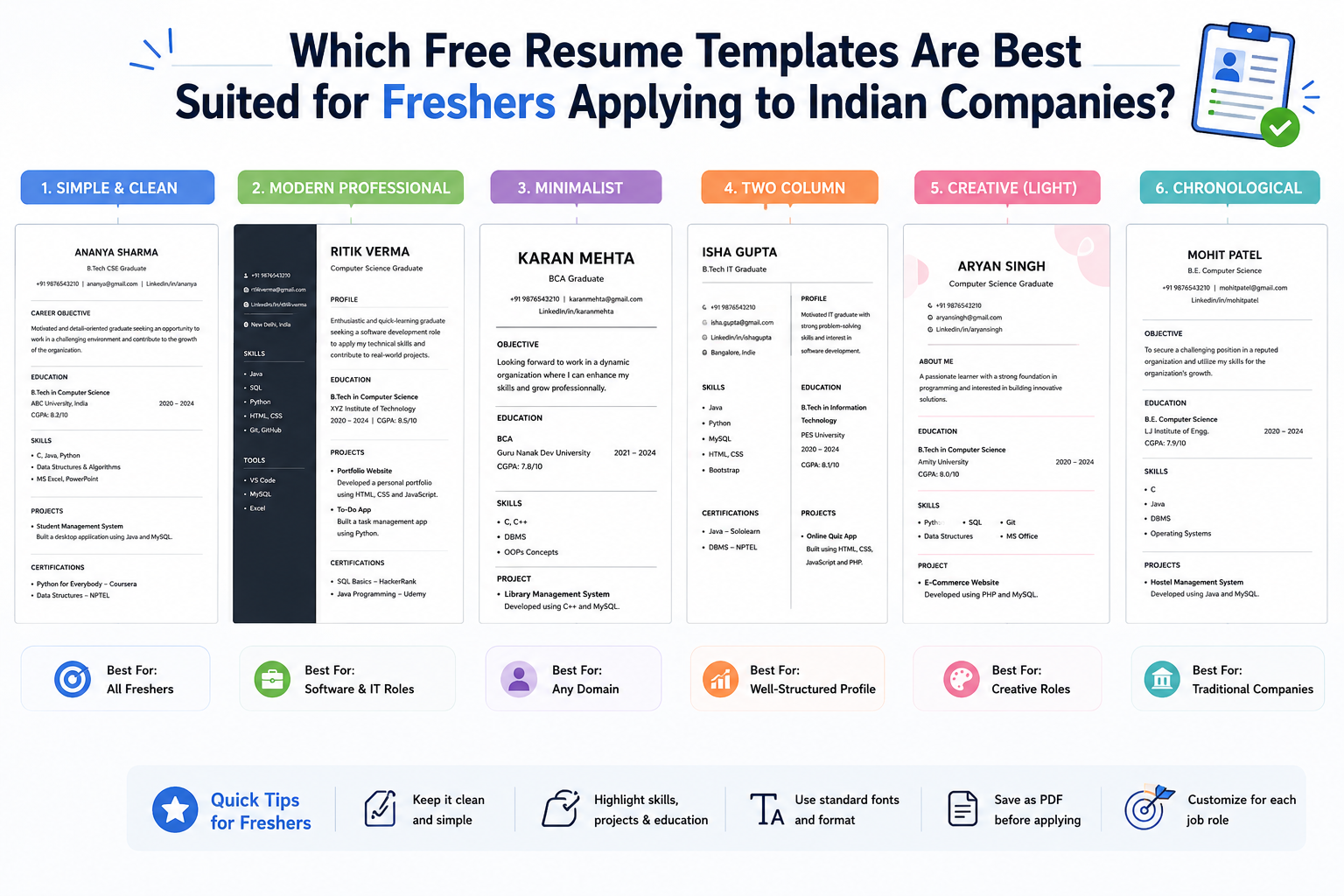
Campus se corporate life tak ka safar ek document se shuru hota hai – aapka resume. Freshers ke liye challenge unique hota hai. Experienced professionals ke paas job titles aur achievements ka history hota hai, lekin freshers ko apni potential, academic rigor aur practical capability ka narrative construct karna padta hai. Sawal ye hai ki which free resume templates are best suited for freshers applying to Indian companies – ye sirf aesthetics ka nahi, balki ek strategic sawaal hai. Aapko apne aap ko Indian recruitment ecosystem mein present karna hai, jo ATS se dominated hai, lekin saath hi traditional hiring managers ke human touch ko bhi satisfy karna hai.
Indian job market mein error ka margin bohot kam hai. Top MNCs (TCS, Infosys, Wipro, HCL), startups aur legacy firms ke recruiters average 6-7 seconds lagate hain initial resume scan karne mein. Is brief window mein, aapka resume template woh frame hai jiske through aapki potential dikhti hai. Galat template aapki high GPA ko bury kar sakta hai, aapke internships ko obscure kar sakta hai, ya ATS algorithm se automatic rejection la sakta hai. Aur sahi template – jo ATS-compliant aur professionally designed ho – aapko thousands mein se shortlist tak pahuncha sakta hai.
Ye comprehensive guide Indian freshers ke liye definitive resource hai. Hum resume ki anatomy, Indian hiring landscape ki nuances, aur best free resume templates ka detailed evaluation karenge. Hum generic advice se aage badhkar actionable strategies denge – layout, content hierarchy, aur format selection par – jo current industry standards ke according ho.
Free Resume Builder
Don’t let a weak resume decide your future.
Thousands of people are getting rejected — not because they’re bad, but because their resume doesn’t speak for them. Make a resume that actually gets shortlisted.
Your next job is closer than you think.
Start in 2 minutes.
No complicated forms. Just pick a template, fill details, And Apply.
Apply Now Your Job →Indian Recruitment Landscape ko Samjho (Freshers ke Liye)
Template select karne se pehle, ye samajhna zaroori hai ki resume kahan padha jayega. Indian recruitment ecosystem ek hybrid model hai – modern, data-driven hiring practices aur traditional, relationship-based evaluation methods dono ka mel.
ATS Ka Dominance
Sabse pehla gatekeeper bade Indian companies ke liye – jisme TCS, Infosys, Wipro, HCL aur major banking sectors shamil hain – woh Applicant Tracking System (ATS) hota hai. Ye software resumes parse karta hai, keywords, skills aur educational data extract karta hai, aur har candidate ko "relevance score" deta hai. Agar resume template complex hai, toh ATS use sahi se nahi padh paata – chahe candidate kitna bhi qualified ho, score zero aa sakta hai.
Fresher ke liye primary keywords hote hain: academic projects, specific technical skills (programming languages, tools), internships, aur certifications. Jo template text boxes, columns, graphics, ya icons use karta hai, woh often parsing engine ko confuse kar deta hai. Text galat order mein padha ja sakta hai, ya important information skip ho sakti hai. Isliye "best" template woh nahi jo sabse beautiful ho, balki woh jo 100% data integrity ensure kare parsing process ke dauran.
Interlinking: ATS-friendly format ke baare mein aur jankari ke liye padhein – ATS-Friendly Resume Format for Beginners – Complete Guide
Human Recruiter Factor
Jab resume ATS pass kar leta hai, toh woh human recruiter ke desk par pahunchta hai. Indian context mein recruiters often specific signals dhundhte hain. Clarity, brevity, aur logical flow ki value hoti hai. "One-page rule" almost universally enforced hai freshers ke liye India mein. Koi fresher jiske paas work experience nahi hai, uska two-page resume often lack of conciseness ya fluff bharne ki koshish lagta hai.
Indian market mein kuch details include karna preferred hai jo western resumes mein omit ho jaati hain. Photo inclusion MNCs mein kam mandatory ho raha hai, lekin many Indian IT aur service sectors mein abhi bhi common hai (haan ab bias reduce karne ke liye trend "no photo" ki taraf ja raha hai). Lekin contact details, clear professional summary, aur academic projects ka robust section non-negotiable hai.
Industry-Specific Expectations
Different sectors ki alag expectations hoti hain. Software engineering role ke liye product-based company (Zoho, Flipkart) mein technical skills aur GitHub repositories par emphasis chahiye. Sales role ke liye FMCG company (HUL, ITC) mein communication skills, internships, aur extracurricular leadership par focus chahiye. Marketing role ke liye visually creative resume acceptable ho sakta hai, jabki finance role strict, conservative formatting demand karta hai.
In nuances ko samajhna pehla step hai which free resume templates are best suited for freshers applying to Indian companies ka jawab dene mein. Template itna flexible hona chahiye ki woh in varying requirements ke hisaab se adapt ho sake, lekin core structure ATS ko satisfy kare.
ATS-Friendly Resume Template ki Anatomy
Best template decide karne ke liye pehle technical requirements samajhna hoga. Sabhi "free templates" jo online milte hain, woh equal quality ke nahi hote. Kayi templates visual impact ke liye design kiye jaate hain machine readability ki cost par.
File Format: PDF vs. DOCX Debate
PDF generally formatting preserve karne ke liye better hota hai different devices par, lekin many Indian ATS systems still Microsoft Word (DOCX) files prefer karte hain kyunki woh parse karna easier hota hai. Trend shift ho raha hai. Safe strategy Indian freshers ke liye: ek DOCX version banao online portals ke liye jo strictly DOCX maange, aur ek PDF version banao email applications ya networking ke liye. Template khud Word mein editable hona chahiye taaki easy customisation ho sake.
Font Selection aur Sizing
Font aapke resume ki voice hai. Indian corporate world mein readability paramount hai. Serif fonts (jaise Times New Roman) traditional hain lekin tech roles ke liye outdated lag sakte hain. Sans-serif fonts (jaise Arial, Calibri, Helvetica, Roboto) modern, clean aur screen par highly readable hain. Body text ke liye font size 10-12 points aur headings ke liye 14-16 points hona chahiye. Decorative ya script fonts bilkul use na karein – woh often ATS parsers ke liye unreadable hote hain.
Layout aur Structure
Template ka sabse critical element layout hai. Single-column layouts gold standard hain ATS compatibility ke liye. Multi-column layouts visually appealing lagte hain lekin often ATS text ko galat order mein padh leta hai (jaise right column left se pehle, ya columns ke across top to bottom). Iska result scrambled content hota hai jo recruiter aur software dono ke liye meaningless ho jaata hai.
Headings clear aur standard hone chahiye. Use karein "Experience", "Education", "Skills", "Projects" – creative variations jaise "My Journey" ya "What I Know" se bachein. Standard headings help karte hain ATS ko aapki information sahi categorize karne mein.
Graphics aur Visual Elements
Freshers often colorful templates ke saath icons, progress bars aur photos use karne ka temptation feel karte hain. Lekin ye elements ATS ke dushman hain. Progress bars (e.g., 80% in Python) subjective hote hain aur machine ke liye meaningless. Icons ko text ki tarah misread kiya ja sakta hai ya ignore kar diya jaata hai. Best free resume templates woh hain jo white space aur typography par rely karte hain, graphics par nahi.
Interlinking: ATS-friendly resume format ke baare mein aur padhein – ATS-Friendly Resume – Complete Guide
Top Free Resume Templates for Indian Freshers – Comparative Analysis
Ab hum requirements samajh chuke hain, toh best free sources evaluate karte hain resume templates ke liye. Unko categorize kiya gaya hai suitability, ATS compatibility aur ease of customization ke hisaab se.
1. Microsoft Word Built-in Templates
Microsoft Word sabse accessible tools mein se hai resume creation ke liye. Built-in templates (File > New > Resume) generally safe hote hain, lekin quality vary karti hai. Indian freshers ke liye "Basic" ya "Simple" templates best choices hain. Avoid karein templates with heavy graphics, sidebars, ya complex tables.
Pros: Fully ATS compatible, easy to edit, no learning curve, completely free.
Cons: Generic lag sakte hain; limited design flexibility.
Best For: Conservative industries like Banking, Finance, and Government sectors jahan traditional formatting preferred hai.
Word mein choose karte waqt "Modern" ya "Minimalist" designs dekhein jo clean, single-column layout use karte hain. Ye templates often subtle color use karte hain headers mein – jo professional touch add karta hai bina readability compromise kiye.
2. Google Docs Templates
Google Docs library of templates offer karta hai jo cloud-based aur easily shareable hain. "Serif" aur "Swiss" templates particularly popular hain Indian freshers ke beech – clean, professional look ke liye. Google Docs real-time collaboration allow karta hai, jo useful hota hai agar mentor ya career counselor aapka resume review kar raha ho.
Pros: Cloud-based, excellent collaboration features, clean designs, easy to export as PDF or DOCX.
Cons: Formatting kabhi kabhi shift ho sakti hai jab Word mein export karein agar careful na karein.
Best For: Tech startups, IT services, aur roles requiring modern, clean aesthetic.
Indian market ke liye "Serif" template strong contender hai. Ye text-heavy hai – jo substance signal karta hai – aur standard font use karta hai jo ATS-friendly hai. Isme "Academic Projects" section ke liye ample space hai – jo freshers ke liye crucial hai.
3. Canva (With Caution)
Canva ne design mein revolution la di hai, hazaron beautiful resume templates offer karta hai. Lekin specific sawaal which free resume templates are best suited for freshers applying to Indian companies ke liye Canva strategic approach maangta hai. Canva stunning designs offer karta hai, lekin many of them ATS-friendly nahi hote due to text boxes, graphics, aur complex layouts.
Pros: Highly customizable, visually stunning, vast library of designs.
Cons: Many templates ATS-compliant nahi; text parsers ke liye unreadable ho sakta hai.
Best For: Creative roles (Design, Marketing, Content) jahan resume khud portfolio piece ho. Not recommended for mass-application to IT or traditional sectors.
Agar Canva use karna hai, toh freshers "Minimalist" ya "Simple" categories par stick karein. Avoid karein any template with background images, icons for contact info, ya multi-column layouts. Phir bhi, safe rahega ki Canva design se text copy karke Word document mein daalein – taaki final file pure text ho ATS ke liye.
4. Online Resume Builders (Free Tiers)
Several online resume builders hain jaise Resume.com, Zety (free trial), Novoresume. Ye platforms often claim ATS-optimized hain. Ye structured guidance offer karte hain, lekin inke free tiers often downloading restrict karte hain ya watermarks add karte hain. Fresher on a budget ke liye, in free tiers par rely karna limiting ho sakta hai. Haan, ye excellent hain resume ki structure samajhne ke liye.
Pros: Guided writing process, structured content, ATS optimization features.
Cons: Free versions mein limitations hoti hain; some require payment to download.
Best For: Freshers who need guidance on what to write but have discipline to copy structure into free Word document.
Interlinking: 2026 ke best resume formats ke baare mein padhein – Resume Format 2026 – Complete Guide
Comparison Table: Resume Template Options for Indian Freshers
| Template Source | ATS Compatibility | Customization Level | Cost | Best Use Case in India |
|---|---|---|---|---|
| Microsoft Word (Simple) | High | Medium | Free | Banking, IT Services, MNCs |
| Google Docs (Serif/Swiss) | High | Medium | Free | Startups, Tech Roles, General Corporate |
| Canva (Minimalist) | Low to Medium | High | Free (with limitations) | Creative, Marketing, Design Roles |
| Online Builders (Free Tier) | Medium to High | Low | Freemium | Guided writing for complete beginners |
Is analysis ke basis par, average Indian fresher ke liye jo IT, service aur corporate roles ke liye apply kar raha hai, consensus hai ki Microsoft Word ya Google Docs ka single-column template use karein. Ye ensure karta hai ki resume digital gatekeepers ko pass kare aur human review ke liye professional bane.
Critical Sections – Har Indian Fresher Resume Mein Yeh Hona Chahiye
Sahi template choose karna sirf aadha kaam hai. Template ke andar ka content Indian context ke according hona chahiye. Template sirf ek vessel hai; content cargo hai. Freshers ke liye specific sections zyada weight carry karte hain experienced professionals ke comparison mein.
1. Professional Summary (Objective Nahi)
Purane zamane ke resumes "Objective" statement use karte the (e.g., "Seeking a challenging position to utilize my skills") – ye outdated hai. Modern resumes "Professional Summary" ya "Profile" maangte hain. Ye 3-4 line ka paragraph hona chahiye resume ke top par.
Indian fresher ke liye is summary mein ye highlight hona chahiye:
- Academic background (Degree, University)
- Key technical or soft skills
- Specific areas of interest or specialization
- Passion ya drive ki jhalak
Example: "Motivated Computer Science graduate from [University Name] with strong foundation in Java, Python, and Web Development. Proven track record of academic excellence with 9.2 CGPA. Eager to leverage internship experience in full-stack development to contribute to innovative software solutions at a leading tech firm."
2. Education – Freshers Ke Liye Core Section
Freshers ke paas extensive work experience nahi hota, isliye Education section resume ka sabse prominent part hota hai. Isko summary ke immediately baad, top par rakhna chahiye. India mein standard practice ye hai:
- Degree Name (e.g., B.Tech in Computer Science)
- University/College Name and Location
- Year of Passing (ya Expected Year)
- CGPA or Percentage (agar 7.0 CGPA ya 70% se upar, otherwise optional)
- Relevant Coursework: 4-6 subjects jo job role se relevant ho (e.g., Data Structures, Algorithms, Database Management)
Relevant coursework include karne se ATS ko aapke academic background aur job description keywords match karne mein help milti hai.
3. Projects – Practical Proof
Ye differentiator hai Indian freshers ke liye. Education theoretical knowledge dikhata hai, jabki projects practical application demonstrate karte hain. Ye section non-negotiable hai. 2-3 significant academic ya personal projects detail mein likhein.
STAR method use karein (Situation, Task, Action, Result) projects describe karne ke liye:
- Situation: Problem kya thi?
- Task: Aapki kya role thi?
- Action: Kaunsi technologies use karein? Kya steps liye?
- Result: Kya outcome raha? (e.g., "Improved efficiency by 20%", "Deployed on GitHub", "Solved 500+ user queries")
Example: Library Management System | Python, MySQL, Tkinter
- Developed desktop application to manage book inventory and member records for college library.
- Implemented search algorithms to reduce book retrieval time by 40%.
- Designed relational database schema to handle 1000+ records efficiently.
Interlinking: Resume projects section kaise likhein – Project on the Resume – Complete Guide
4. Internships and Work Experience
Internship short ho ya unpaid, dono is section mein aate hain. Treat it like a full-time job. Company name, role, duration, aur location likhein. Bullet points mein responsibilities aur achievements describe karein. Duties nahi, impact par focus karein. Agar formal internship nahi hai toh significant academic collaborations ya volunteer work include karein jisme professional skills use hue ho.
5. Skills – Technical and Soft
Indian recruiters specific mix of skills dhundhte hain. "Skills" section categorized hona chahiye:
- Technical Skills: Programming languages (Java, C++, Python), Tools (Git, Docker, AWS), Frameworks (React, Django), Software (Excel, Tally, SAP)
- Soft Skills: Communication, Team Leadership, Problem Solving, Adaptability. Soft skills ko sirf list karne se better hai ki projects descriptions mein demonstrate karein.
Avoid karein "skill bars" (e.g., 90% in Excel wali bar) – ye subjective hain aur koi value add nahi karte. Sirf skill ka naam likhein.
Interlinking: Resume ke liye key skills kaise likhein – Key Skills for Resume – Complete Guide
6. Certifications and Achievements
Indian freshers often hackathons, coding contests (CodeChef, HackerRank) mein participate karte hain, aur certifications lete hain Coursera, edX, ya NPTEL se. Ye sab prominently listed hone chahiye. Rank mention karna (e.g., "Top 10% in national coding contest") credibility add karta hai. Google, AWS, ya Microsoft jaise recognized platforms se certifications highly valued hote hain.
Design Principles for Indian Corporate Aesthetic
Functionality king hai, lekin aesthetics ko ignore nahi kiya ja sakta. Indian corporate aesthetic generally conservative hai but evolving. Ye design principles ensure karte hain ki aapka resume professional lage.
Color Usage
Color sparingly use karein. Ek single accent color (jaise navy blue, dark green, ya charcoal grey) headings aur lines ke liye sufficient hai. Bright colors like neon green, red, ya orange avoid karein. Background white hona chahiye. Colored backgrounds for whole page ya specific sections use na karein – isse readability issues ho sakte hain jab print karein ya different screens par dekhein.
White Space and Margins
White space wasted space nahi hai – ye design element hai jo readability improve karta hai. Ensure adequate margin (at least 0.5 to 1 inch) all sides par. Text cramped feel nahi hona chahiye. Lekin margins itne mat stretch karein ki content sparse lagne lage. Goal hai ek page effectively fill karna without overcrowding.
Consistency
Consistency professional resume ki hallmark hai. Agar aap specific date format use karte hain (e.g., "Jan 2023 – May 2023") ek section mein, toh wahi format everywhere use karein. Agar bullet points use karte hain responsibilities ke liye, toh consistently use karein. Agar job titles bold karte hain, toh saare job titles bold karein. Inconsistent formatting lack of attention to detail suggest karta hai – jo recruiters ke liye red flag hai.
Photo Considerations
India mein photo inclusion gray area hai. Many modern MNCs aur startups prefer no photo to avoid bias, lekin kuch traditional sectors aur specific roles (like sales ya customer-facing roles) mein still professional headshot expected hota hai. Agar photo include karna hai toh ensure karein:
- Professional: Formal attire, neutral background, smiling but not casual
- Recent: Last 6 months ke andar li gayi ho
- Small: Header mein placed ho, page par dominate na kare
Agar job description explicitly photo nahi maangta, toh global best practices follow karte hue omit karna safer hai – isse bias bhi kam hota hai.
Common Mistakes – Free Templates Use Karte Waqt Bachein
Best template ke saath bhi execution errors rejection ka karan ban sakte hain. Ye hain sabse common pitfalls Indian freshers ke liye.
1. Tables se Layout Banana
Many free templates invisible tables use karte hain columns banane ke liye. Ye screen par theek lagta hai, lekin ATS parsers often table cells linear fashion mein padhte hain – jo information scramble kar deta hai. Always single-column layout use karein, ya ensure karein ki tables sirf data presentation ke liye use ho, structural layout ke liye nahi.
2. Keyword Stuffing
Kuch templates "keyword stuffing" encourage karte hain ATS ko trick karne ke liye – har possible skill list kar do chahte aapko aati ho ya nahi. Indian recruiters experienced hote hain aur interview mein ye pakad lenge. Better hai ki relevant skills ki concise list ho – long list irrelevant skills se. Authenticity key hai.
3. Typos aur Grammatical Errors
Spelling mistakes wala resume instant rejection hota hai. Indian job market highly competitive hai, recruiters ke paas errors ke liye patience nahi hai. Tools use karein jaise Grammarly ya Word ka built-in spell check, lekin sirf inpar rely na karein. Kisi friend ya mentor se proofread karwao.
4. Irrelevant Personal Details
Purane zamane ke Indian resumes mein father's name, mother's name, marital status, religion, blood group sab likha jaata tha. Ye ab standard practice nahi hai aur unconscious bias create kar sakta hai. Sirf apna name, phone number, email, LinkedIn URL, aur location (City, State) likhein. Personal details hatayein unless job posting specifically maange (jo ab rare hai).
5. Generic Objective Statements
Generic objective jaise "Looking for a job in a growing company" recruiter ko kuch nahi batata. Har application ke liye apna summary tailor karein. Agar fintech company mein apply kar rahe ho toh finance aur technology mein interest mention karein. Agar e-commerce firm mein apply kar rahe ho toh user experience aur scale ke liye passion highlight karein.
Interlinking: ATS resume mistakes se bachne ke liye padhein – ATS Resume Tips – How to Actually Get Past the Filter
Decision Framework – Sahi Template Kaise Choose Karein
Jab dozens of free options saamne hon toh final decision kaise lein? Ye simple framework use karein:
- Job Description Analyze karein: Role creative hai ya analytical? Creative hai toh thoda designed template acceptable hai. Analytical hai toh basic, text-heavy template par stick karein.
- Company Culture Check karein: Company traditional bank hai ya modern startup? Traditional companies conservative formats prefer karti hain; startups may appreciate a bit more personality.
- ATS ke liye Test karein: Finalize karne se pehle, apne resume ka text copy karke plain text editor (Notepad) mein paste karein. Agar text correct order mein meaningful hai toh template ATS-friendly hai. Agar jumbled hai toh unsafe hai.
- Print karein: Resume ko standard A4 sheet par print karein. Kya clean lag raha hai? Font readable hai? Ek page mein fit ho raha hai?
- Feedback lo: Career counselor ya industry ke kisi senior ko dikhao. Unki feedback invaluable hai.
Is framework se ensure karein ki aapka template sirf visually appealing nahi balki strategically effective ho aapke specific goal ke liye.
Advanced Tips – Indian Market Mein Stand Out Karne Ke Liye
Sahi template milne ke baad, ensure kaise karein ki aapka resume stand out kare? Ye advanced strategies tailor ki gayi hain Indian context ke liye.
Quantify Your Achievements
Numbers speak louder than words. "Improved coding speed" likhne se better hai "Reduced code execution time by 30%" likhna. "Managed a team" likhne se better hai "Led a team of 5 students to deliver a project 2 weeks ahead of schedule" likhna. Indian recruiters data pasand karte hain – ye concrete proof hai aapke impact ka.
Projects Section ko Leverage Karein
Freshers ke liye project section primary selling point hai. Ise detailed banaayein. Links include karein – GitHub repository, live demos, ya portfolio websites. Ye initiative dikhata hai aur recruiter ko aapki skills verify karne ka mauka deta hai immediately.
Keywords ke liye Optimize Karein
Job description ko carefully padhein. Agar job "Python", "Data Analysis", aur "SQL" maang raha hai toh ensure karein ki ye exact words aapke resume mein aaye. Synonyms use na karein agar job description specific terminology use kar raha hai. ATS exact matches dhundhta hai.
Resume ko Updated Rakhein
Aapka resume ek living document hai. Har nayi skill seekhne par, har project complete karne par, har certification lene par update karein. Apply karne se pehle resume likhna shuru karne ka intezaar na karein. Ek master resume banayein jisme saari details ho, phir har application ke liye tailored version banayein.
Interlinking: Resume work experience section kaise likhein – Resume Work Experience – Complete Guide
People Also Ask (Hinglish Mein)
India mein fresher ke resume ki ideal length kya hai?
Strictly one page. Recruiters concise documents prefer karte hain jo quickly scan ho sakein. One-page resume aapko prioritise karne par majboor karta hai most relevant information ko aur fluff eliminate hota hai. Sirf agar aapke paas extensive research publications ya significant project experience ho (10+ major projects) tabhi two-page resume consider karein – lekin freshers ke liye ye rare hai.
Kya Indian companies ke liye resume mein photo lagani chahiye?
Company aur role par depend karta hai. IT MNCs, startups, aur modern corporate roles ke liye generally photo omit karna better hai – global standards align karne aur bias avoid karne ke liye. Lekin sales, hospitality, media, ya traditional Indian sectors mein professional headshot often expected hota hai. Jab doubt ho toh job description check karein – agar photo nahi maangi toh omit karna safer hai.
Kya Canva resume templates Indian ATS systems ke liye safe hain?
Most Canva templates ATS systems ke liye safe nahi hote kyunki woh often text boxes, graphics, aur complex layouts use karte hain jo parsing software ko confuse kar dete hain. Ye beautiful lagte hain lekin automated system se rejection ho sakta hai. Agar Canva use karna hi hai toh simplest "Minimalist" templates par stick karein aur ensure karein ki final file text-based PDF ya Word document ho. Haan, Microsoft Word ya Google Docs templates generally ATS compatibility ke liye safer hote hain.
Resume submit karte waqt kaunsa file format use karein?
Safest file format PDF hai, lekin ensure karein ki PDF "text-based" ho (scanned image na ho). Agar job portal specifically DOCX maange toh DOCX bheje. Modern ATS dono padh lete hain. Best practice: ek PDF version ready rakhein aur ek DOCX version – portal ke instruction ke according bhejein.
Kya mujhe har job ke liye same template use karna chahiye?
Nahi. Har job description ke according template ki layout aur sections thoda modify kar sakte ho. Example: creative role ke liye thoda design acceptable hai, lekin finance role ke liye conservative template use karo. Bas ensure karo ki core ATS-friendliness (single-column, standard fonts, no graphics) bani rahe.
Conclusion (Aakhri Baat)
Sahi free resume template choose karna Indian freshers ke liye pehla aur sabse important step hai apni job search journey mein. Yaad rakhein:
- Functionality over flash: ATS pehle aata hai, design baad mein.
- One page, single column: Ye gold standard hai.
- Content hierarchy sahi rakhein: Education, Projects, Skills – ye freshers ke liye most important hain.
- Har application ke liye tailor karein: Ek hi template sabke liye use karna matlab rejection invitation dena.
- Free tools ka istemal karein: Microsoft Word, Google Docs – ye sabse safe aur accessible hain.
Microsoft Word ya Google Docs ka simple, single-column, ATS-friendly template hi woh foundation hai jispar aap apna successful career bana sakte ho. Is template mein sahi content (quantified achievements, relevant projects, clean formatting) bharke aap apne aap ko thousands of generic resumes se alag kar sakte ho.
Yaad rakhiyega – aapka resume aapka ambassador hai. Template frame hai, lekin picture aapko khud banana hai. Aaj hi sahi template choose karein, apna resume tailor karein, aur apni dream job ke liye apply karein.
Related Articles (Interlinking – Aur Padhein):
- How to Write a Resume in 2026 – Complete Guide
- How to Make a Winning CV in 2026
- 10 Essential Resume Sections in 2026
- Resume Format 2026 – Complete Guide
- ATS Resume Tips – How to Get Past the Filter
Free Resume Builder
Don’t let a weak resume decide your future.
Thousands of people are getting rejected — not because they’re bad, but because their resume doesn’t speak for them. Make a resume that actually gets shortlisted.
Your next job is closer than you think.
Start in 2 minutes.
No complicated forms. Just pick a template, fill details, And Apply.
Apply Now Your Job →