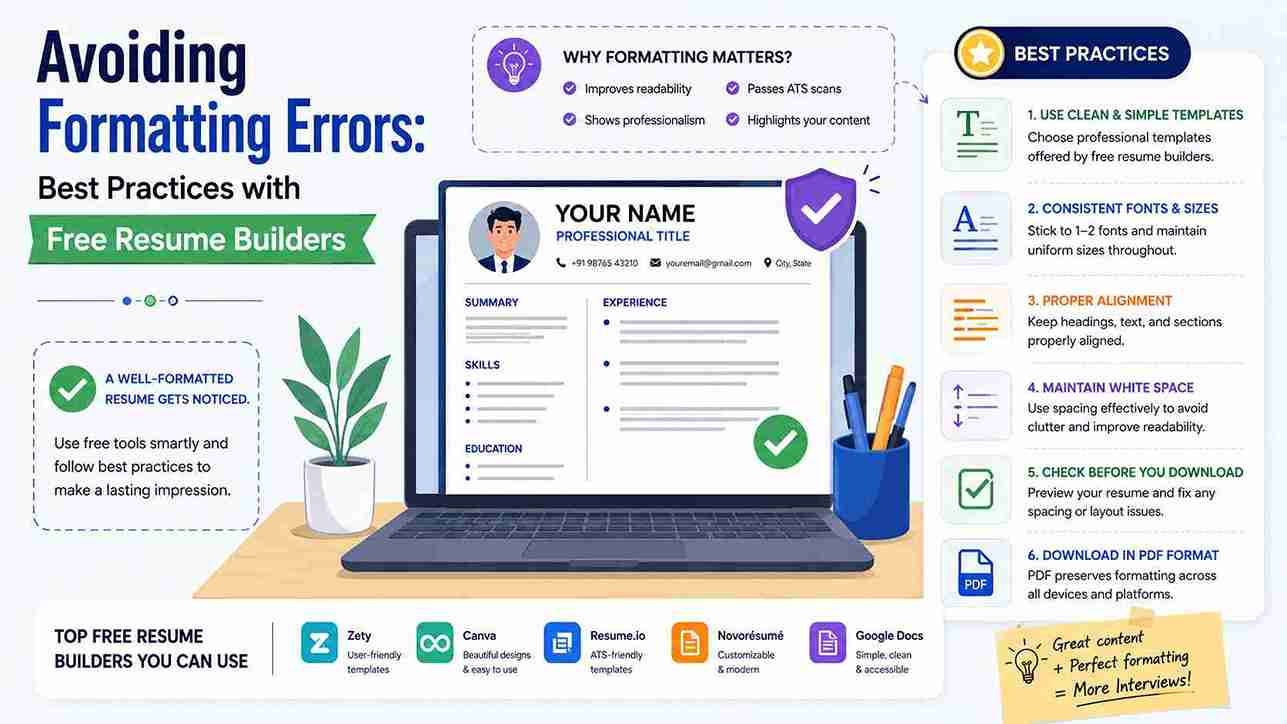
Naukri, LinkedIn और कंपनी career portals पर एक ही resume का अलग-अलग दिखना बहुत common समस्या है, खासकर जब आप free resume builder से PDF या Word file download करते हैं। कई fresher सोचते हैं कि design जितना attractive होगा, selection के chances उतने ज्यादा होंगे, लेकिन Indian recruiters और ATS software जैसे Naukri ATS, Taleo, Workday और Zoho Recruit सबसे पहले formatting की clarity और consistency check करते हैं। अगर heading गलत जगह shift हो गई, table के अंदर text फंस गया, या font ATS read नहीं कर पाया, तो आपका resume shortlist होने से पहले ही reject हो सकता है। ResumeEra.xyz पर हमने हजारों Indian resumes का analysis किया है और पाया है कि 60% से ज्यादा formatting errors free builders के default templates, गलत export settings और inconsistent spacing की वजह से आते हैं। इस guide में हम practical, step-by-step best practices share करेंगे ताकि आपका resume हर device, हर ATS और हर recruiter की screen पर एक जैसा professional दिखे, चाहे आप fresher हों या 10 साल के experienced professional।
1. Free Resume Builder से Formatting क्यों बिगड़ती है
Free resume builders का सबसे बड़ा advantage है speed और ready-made design, लेकिन यही design कई बार formatting errors की वजह बन जाता है। ज्यादातर free tools में drag-and-drop editor होता है जो screen पर तो सुंदर दिखता है, लेकिन जब आप उसे PDF या Docx में export करते हैं तो columns, text boxes और graphics अपनी जगह से हिल जाते हैं। भारतीय job market में जहाँ एक recruiter को एक दिन में 200 से 300 resumes देखने होते हैं, ऐसी छोटी सी गड़बड़ी भी negative impression देती है। कई builders में default template दो column layout में बना होता है, जो desktop पर अच्छा लगता है पर ATS उसे single column की तरह linear read नहीं कर पाता। नतीजा, आपका Work Experience section Skills के नीचे merge हो जाता है और recruiter को सही sequence समझ नहीं आती।
दूसरी बड़ी वजह है font और spacing का inconsistent होना। कुछ builders fancy fonts जैसे Script या decorative fonts offer करते हैं जो ATS dictionary में नहीं होते। जब Naukri या LinkedIn Easy Apply के through resume upload होता है, तो ATS उन fonts को plain text में convert करते समय अक्षरों को तोड़ देता है। इसी तरह line spacing अगर 1.0 से कम है तो PDF में text overlap होने लगता है, और अगर 1.5 से ज्यादा है तो एक पेज का resume दो पेज में खिंच जाता है। ResumeEra.xyz के templates इसी problem को solve करने के लिए single-column, ATS-tested structure पर बने हैं, जहाँ हर heading, bullet और margin पहले से optimized है।
ATS Parsing कैसे Fail होता है
ATS यानी Applicant Tracking System resume को इंसान की तरह नहीं, बल्कि code की तरह पढ़ता है। वह सबसे पहले standard headings ढूंढता है जैसे Work Experience, Education, Skills, Projects, Certifications। अगर आपने heading को मेरा अनुभव या My Career Journey जैसा creative नाम दिया, तो ATS उसे recognize नहीं करेगा और पूरा section skip कर देगा। Free builders में अक्सर heading को image या text box में डाला जाता है, जिसे ATS text नहीं बल्कि graphic समझता है। इसी तरह tables, headers, footers और text boxes के अंदर लिखा content कई ATS पूरी तरह ignore कर देते हैं। भारत में TCS, Infosys, Wipro जैसी बड़ी कंपनियों के ATS में यह parsing बहुत strict है। इसलिए हमेशा simple headings, bullet points और plain text layout का use करें। ResumeEra.xyz पर हर template में headings पहले से ATS-friendly रखी गई हैं ताकि parsing error का risk न रहे।
PDF vs Word में Layout Shift की असली वजह
बहुत से candidates confuse रहते हैं कि resume PDF में भेजें या Word में। Microsoft Word का .docx format ATS के लिए सबसे safe माना जाता है क्योंकि वह text को editable और searchable रखता है। PDF visually consistent रहता है, लेकिन अगर PDF image-based बना है तो ATS उसे read नहीं कर पाएगा। Free builders में जब आप Word file download करते हैं और फिर उसे खुद PDF में convert करते हैं, तो margin और font embedding की वजह से layout shift होता है। उदाहरण के लिए, builder में A4 size पर बना resume जब US Letter size में convert होता है तो right side का text कट जाता है। Best practice है कि पहले Word में save करें, फिर File > Save As > PDF से export करें और font embedding को enable रखें। ResumeEra.xyz आपको दोनों options देता है - ATS के लिए Docx और recruiter को भेजने के लिए print-ready PDF, दोनों में layout 100% same रहता है।
2. ATS-Friendly Resume Formatting के Golden Rules
ATS-friendly formatting का मतलब boring design नहीं, बल्कि clean और predictable structure है। Indian recruiters 6 से 8 सेकंड में resume scan करते हैं, इसलिए उन्हें तुरंत समझ आना चाहिए कि आपकी education कहाँ है और experience कहाँ। इसके लिए कुछ golden rules follow करना जरूरी है। पहला, हमेशा single column layout use करें, खासकर अगर आपका experience 2 पेज से ज्यादा है। दूसरा, section headings को bold और 12-14 pt में रखें, body text को 10-11 pt में। तीसरा, graphics, charts, progress bars और icons से बचें, क्योंकि ATS उन्हें decode नहीं कर पाता। चौथा, bullet points के लिए simple dot या hyphen use करें, arrow या tick जैसे symbols नहीं।
इन rules को follow करने से आपका resume न सिर्फ ATS में pass होगा बल्कि recruiter को भी पढ़ने में आसान लगेगा। ResumeEra.xyz के सभी templates में ये rules by default apply होते हैं, ताकि आपको manually adjust न करना पड़े।
Font, Margin और Spacing का सही Combination
Font selection में हमेशा professional और ATS-safe fonts चुनें जैसे Calibri, Arial, Garamond, Times New Roman। पूरे resume में एक ही font family use करें, heading और body में सिर्फ size और weight का फर्क रखें। Margin के लिए चारों तरफ 0.6 से 0.8 inch रखें, इससे content न तो बहुत congested लगेगा और न ही बहुत खाली। Line spacing 1.15 ideal है, paragraph के बाद 6 pt का gap रखें। Section के बीच 12-14 pt का gap रखें ताकि visual hierarchy clear हो। Date और location को right align करने के बजाय same line में tab से align करें, क्योंकि right align कई बार PDF में misalign हो जाता है। इन छोटी-छोटी details से आपका resume print और screen दोनों पर balanced दिखेगा।
- Font Size: Name 16-18 pt, Headings 12-14 pt, Body 10-11 pt
- Margins: 0.6 - 0.8 inch सभी तरफ, header/footer खाली रखें
- Spacing: Line spacing 1.15, section gap 12 pt, bullet gap 4 pt
- Alignment: Left align पूरे resume में, justification से बचें
- File Name: FirstName_LastName_Resume.pdf जैसा professional नाम रखें
3. Free Resume Builders में सही Template कैसे चुनें
Template चुनते समय सबसे पहले अपने experience level को देखें। Fresher के लिए single page, education-focused template best है जहाँ projects, internships और skills ऊपर हों। Experienced professional के लिए reverse-chronological template सही है जहाँ work experience सबसे पहले आए। Free builders पर अक्सर 30-40 templates दिखते हैं, लेकिन उनमें से सिर्फ 5-6 ही ATS-friendly होते हैं। Template चुनने से पहले check करें कि क्या उसमें tables, double columns या background graphics हैं। अगर हैं तो avoid करें। ResumeEra.xyz पर हर template को ATS Tested tag के साथ label किया गया है, और fresher, experienced, IT, banking, teaching जैसी categories में divide किया गया है ताकि आपको confusion न हो।
दूसरा point है customization की flexibility। कई free builders में आप font या margin change नहीं कर सकते, जिससे बाद में editing में problem आती है। अच्छा builder वह है जो आपको heading rename, section reorder और bullet style बदलने की freedom दे। साथ ही preview option देखें - क्या आप desktop और mobile दोनों में preview देख सकते हैं? क्योंकि कई recruiters mobile पर resume खोलते हैं। ResumeEra.xyz का live preview हर change को real-time दिखाता है, और आप एक click में template switch कर सकते हैं बिना content दोबारा लिखे।
तीसरा, language और keyword optimization देखें। Indian job market में Naukri और LinkedIn पर recruiters specific keywords search करते हैं जैसे Java, GST, Digital Marketing, Tally। Template ऐसा चुनें जहाँ skills section में keywords naturally add हो सकें, और जहाँ bullet points में action verbs के लिए जगह हो। Creative templates में skills को progress bar में दिखाया जाता है, जो visually तो अच्छा है पर ATS उसे 0% read करता है। इसलिए simple bullet list वाला template ही सबसे effective है।
4. Step-by-Step: ResumeEra.xyz पर Error-Free Resume कैसे बनाएं
ResumeEra.xyz पर error-free resume बनाना बहुत simple है, बस नीचे दिए गए steps को sequence में follow करें। यह process fresher और experienced दोनों के लिए same है, सिर्फ content अलग होगा।
- सही Template Select करें: ResumeEra.xyz पर जाएं, अपनी category (Fresher, Experienced, IT, Non-IT) चुनें और ATS-friendly single column template select करें।
- Basic Details सही Format में भरें: नाम, phone, email, LinkedIn और location एक line में add करें। Email professional रखें, जैसे firstname.lastname@gmail.com।
- Headings को Standard रखें: Work Experience, Education, Skills, Projects, Certifications जैसे standard headings use करें, creative headings से बचें।
- Bullet Points में Content लिखें: हर role के लिए 3 से 6 bullets लिखें, हर bullet action verb से शुरू करें और result mention करें। Paragraphs से बचें।
- Font और Spacing Check करें: Editor में font Calibri या Arial रखें, size 11 pt, line spacing 1.15 set करें। Preview में देखें कि text overlap तो नहीं हो रहा।
- Keywords Add करें: Job description से relevant keywords जैसे Python, Excel, Communication Skills को naturally skills और experience में add करें।
- Preview और QA करें: Desktop और mobile preview दोनों check करें, spelling check करें, dates का format (MMM YYYY) consistent रखें।
- Correct Format में Download करें: पहले Docx download करें ATS के लिए, फिर PDF export करें recruiter को भेजने के लिए। दोनों files का नाम FirstName_LastName_Resume रखें।
इन 8 steps को follow करने से आपका resume न सिर्फ visually perfect बनेगा बल्कि हर ATS में 100% parse भी होगा। ResumeEra.xyz का auto-save feature यह भी ensure करता है कि आपका data बीच में lost न हो।
5. Popular Free Resume Builders की तुलना
Market में कई free resume builders हैं, लेकिन हर एक की formatting quality अलग है। नीचे दी गई table में हमने 4 popular options की तुलना ResumeEra.xyz से की है, ताकि आप सही decision ले सकें। यह तुलना Indian recruiters के feedback और ATS test results पर based है।
| Feature | Generic Free Builders | ResumeEra.xyz |
|---|---|---|
| ATS-Friendly Templates | कुछ templates में tables और graphics, parsing fail का risk | सभी templates single-column और ATS-tested |
| PDF / Word Export | कई बार layout shift, font missing | Docx और PDF दोनों में 100% same layout |
| Indian Job Market Focus | US-centric designs, Naukri keywords missing | Naukri, LinkedIn India के लिए optimized |
| Customization | Limited font/margin control, watermark | Full control, no watermark, free download |
| Mobile Preview | अक्सर नहीं मिलता | Live desktop + mobile preview |
| Fresher Support | Experience पर focus, fresher sections कम | Fresher के लिए projects, internships, extra-curricular sections |
Table से clear है कि generic builders design पर ज्यादा focus करते हैं जबकि ResumeEra.xyz readability और ATS compatibility पर। अगर आपका लक्ष्य Indian companies में shortlist होना है तो ATS-friendly builder ही सबसे practical choice है।
Pro Tip: हमेशा resume को Naukri और LinkedIn पर upload करने से पहले एक बार free ATS checker में test करें। अगर score 75% से कम आए तो headings और keywords को revise करें।
6. Common Formatting Mistakes जो हर Fresher और Experienced Candidate करता है
Formatting mistakes अक्सर छोटी लगती हैं पर उनका impact बहुत बड़ा होता है। नीचे सबसे common गलतियाँ और उनके fix दिए गए हैं जो हमने Indian candidates में सबसे ज्यादा देखी हैं।
- Inconsistent Dates और Alignment: एक जगह Jan 2023 - Present और दूसरी जगह 01/2023 लिखना। Fix: पूरे resume में MMM YYYY format use करें और dates को एक ही alignment में रखें।
- Tables और Text Boxes का Use: Skills को table में लिखना ATS के लिए invisible बना देता है। Fix: Simple bullet list use करें।
- Header/Footer में Contact Details: कई builders contact info को header में डालते हैं, जिसे ATS skip कर देता है। Fix: Contact details body के top पर रखें।
- Long Paragraphs: 4-5 lines का paragraph recruiter skip कर देता है। Fix: हर point को 1-2 line के bullet में लिखें, 3-6 bullets per role।
- First Person Pronouns: I, We, My का बार-बार use। Fix: Pronouns हटाएं, action verbs से शुरू करें जैसे Developed, Managed।
- Multiple Fonts और Colors: 2 से ज्यादा font या bright colors use करना। Fix: एक font, दो colors (black + dark blue/grey) ही रखें।
- Spelling और Grammar Errors: खासकर fresher resumes में। Fix: Download से पहले spell check और किसी senior से proofreading कराएं।
- File Name में गलती: Resume_final_final.pdf जैसा नाम। Fix: Rahul_Sharma_Resume.pdf जैसा professional नाम रखें।
इन mistakes को avoid करने से आपका resume न सिर्फ professional दिखेगा बल्कि recruiter का trust भी बढ़ेगा। ResumeEra.xyz का built-in spell checker और formatting validator इनमें से ज्यादातर errors को automatically flag कर देता है।
7. File Save और Export करते समय ध्यान देने योग्य बातें
Resume बनाना जितना important है, उसे सही format में save करना उतना ही जरूरी है। सबसे पहले हमेशा master file को .docx में save करें, क्योंकि यह सबसे ज्यादा ATS compatible है। जब कंपनी specifically PDF मांगे, तब ही PDF भेजें। PDF export करते समय Embed Fonts option को enable रखें ताकि recruiter के system में font change न हो। File size 500KB से 1MB के बीच रखें, इससे email और Naukri upload में problem नहीं होगी।
Export से पहले एक बार print preview जरूर देखें। कई बार screen पर सही दिखने वाला resume print में दो पेज में कट जाता है या margin से बाहर चला जाता है। ResumeEra.xyz में print-ready PDF का option है जो A4 size पर perfectly fit होता है। साथ ही file को कभी भी JPG या PNG में convert करके न भेजें, क्योंकि ATS उसे image समझकर reject कर देता है। अगर आपको LinkedIn पर resume upload करना है तो PDF best है, लेकिन Naukri पर Docx ज्यादा effective रहता है क्योंकि Naukri का ATS Docx को ज्यादा accurately parse करता है।
8. Submit करने से पहले 2-Minute QA Checklist
Resume submit करने से पहले यह quick checklist follow करें। यह 2 मिनट का process आपको बड़े rejection से बचा सकता है।
- क्या सभी headings standard हैं और bold हैं?
- क्या font पूरे resume में consistent है और size 10-11 pt है?
- क्या margins चारों तरफ equal हैं और text कहीं कट नहीं रहा?
- क्या हर section में bullet points हैं और कोई long paragraph नहीं है?
- क्या file नाम professional है और format Docx/PDF सही है?
- क्या contact details body में हैं, header/footer में नहीं?
- क्या spelling, grammar और dates 100% correct हैं?
अगर इन सभी का जवाब हाँ है, तो आपका resume formatting के मामले में पूरी तरह ready है। अब आप confidently Naukri, LinkedIn या कंपनी portal पर apply कर सकते हैं।
FAQ: Resume Formatting से जुड़े सवाल
Free resume builder से बना resume क्या ATS में pass होता है?
हाँ, अगर builder ATS-friendly template provide करता है तो pass होता है। ResumeEra.xyz के सभी templates ATS-tested हैं, उनमें tables, graphics और text boxes नहीं हैं, इसलिए Naukri, Taleo और Workday जैसे ATS उन्हें आसानी से read कर लेते हैं। Generic builders के fancy templates में fail होने का risk ज्यादा होता है।
Resume के लिए PDF बेहतर है या Word (Docx)?
ATS के लिए Docx सबसे safe है क्योंकि वह text को editable रखता है। Recruiter को भेजने के लिए PDF visually consistent रहता है। Best practice है दोनों ready रखना - Naukri पर Docx upload करें और email में PDF attach करें। ResumeEra.xyz दोनों formats में same layout के साथ export देता है।
Resume में कौन सा font और size use करना चाहिए?
Calibri, Arial, Garamond या Times New Roman जैसे professional fonts use करें। Name के लिए 16-18 pt, headings के लिए 12-14 pt और body text के लिए 10-11 pt ideal है। पूरे resume में एक ही font family रखें ताकि consistency बनी रहे।
क्या दो column वाला resume ATS के लिए सही है?
नहीं, ज्यादातर ATS दो column layout को linear read नहीं कर पाते और content को गलत sequence में parse करते हैं। Single column layout सबसे safe है, खासकर Indian ATS के लिए। अगर design में column जरूरी लगे तो भी left column को बहुत narrow रखें और important info को main column में रखें।
Resume कितने पेज का होना चाहिए?
Fresher के लिए एक पेज ideal है। 2-5 साल के experience के लिए एक पेज ही रखें, 5+ साल के लिए दो पेज acceptable है। दो पेज होने पर भी formatting consistent रखें और दूसरे पेज पर कम से कम आधा page content होना चाहिए, एक-दो lines के लिए दूसरा पेज न बनाएं।
Free builder से download के बाद formatting बिगड़ रही है, क्या करूं?
सबसे पहले builder में ही margins और font को standard रखें, फिर Docx में download करके Word में खोलें और Save As PDF करें। अगर फिर भी shift हो रहा है तो ResumeEra.xyz पर same content paste करके ATS-friendly template में export करें, वहाँ layout shift की problem नहीं आती।
क्या resume में photo, graphics या icons लगाना चाहिए?
Indian corporate jobs, IT और banking roles के लिए photo और graphics avoid करें, क्योंकि ATS उन्हें ignore करता है और recruiter का focus content से हट जाता है। सिर्फ creative fields जैसे designing या modelling में ही photo relevant है। Skills को progress bar की जगह bullet list में लिखें।
आपका resume आपकी professional story का पहला impression है, और formatting ही वह frame है जो उस story को clear बनाता है। Free resume builders का सही use तभी होता है जब आप design से ज्यादा readability और ATS compatibility को priority दें। ResumeEra.xyz पर बने ATS-friendly templates, सही font और margin settings, और export best practices को follow करके आप यह ensure कर सकते हैं कि आपका resume हर screen और हर ATS पर एक जैसा impressive दिखे। अब जब आपको best practices पता हैं, तो अपना resume एक बार review करें, checklist से verify करें और confident होकर अपने dream job के लिए apply करें।
