Quick Navigation
- Introduction
- 5-Minute Checklist
- Formatting
- Keywords & Titles
- Content Strategy
- Common Mistakes
- FAQ
- India Tips
- Tools & Resources
- Summary
Introduction: Why Your Resume Isn't Getting Past the Gatekeeper
You've applied to 50+ jobs. The rejections keep coming. Your experience is solid. Your skills are relevant. But the callbacks? Zero.
The silent blocker isn't your background—it's the Applicant Tracking System (ATS). Before a human ever sees your resume, an automated system scans it for formatting, keywords, structure, and relevance. If the ATS can't parse your document or finds weak keyword matches, your resume gets buried in a database, ranked below candidates with weaker experience but better formatting.
Quick fact: 75% of resumes never reach a human recruiter due to ATS filtering. A single formatting error or missing keyword can cost you the interview.
This guide walks you through a comprehensive ATS resume checklist designed for Indian job seekers applying to IT, marketing, finance, and healthcare roles in 2026. Use it as your 15-minute pre-flight before hitting submit.
The Pre-Apply Checklist: 5-Minute Quick Start
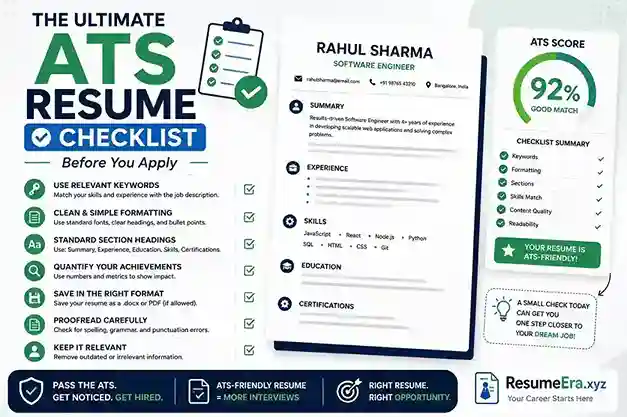
Before sending your resume, work through this ATS resume checklist in order. Each section takes 2–3 minutes; skip steps at your own risk.
✅ Step 1: Read the Job Ad Twice
Highlight 5–7 must-have skills and terms. Look for exact job titles, software names, certifications, and domain language. Example: if the ad says "Power BI," your resume must say "Power BI"—not "data visualization."
✅ Step 2: Check Your File Name
Use: Firstname_Lastname_Role_Location.pdf
Bad: resume.pdf, CV.pdf, or MyResume_v5_FINAL.pdf
Good: Rohan_Sharma_Data_Analyst_Bangalore.pdf
✅ Step 3: Verify Formatting
Single column, left-aligned, standard fonts (Calibri, Arial, Times New Roman). No tables, text boxes, graphics, or sidebars. Save as PDF or DOCX unless the portal specifies otherwise.
✅ Step 4: Scan for Keywords
Copy 5–7 high-value terms from the job ad into your resume naturally. Place them in your summary, experience bullets, and skills section. Don't keyword-stuff—ATS punishes it.
✅ Step 5: Review & Send
Read aloud, check for typos, export to PDF one final time, and apply while the role is warm (first 48 hours).
ATS-Friendly Formatting: The Non-Negotiables
ATS software reads your resume line-by-line, top-to-bottom. If the structure is messy, the parser fails, and you lose points—even if your experience is outstanding.
Fonts & Text
- Use Calibri, Arial, Helvetica, or Times New Roman at 10.5–12 pt
- Single line spacing (1.0–1.15)
- Standard black text on white background
- Avoid decorative fonts, scripts, or colored text
Sections & Headings
ATS recognizes standard section headers. Use these exact labels:
- Summary or Professional Summary
- Experience or Work Experience
- Education
- Skills
- Certifications (if applicable)
- Projects (for freshers or designers)
Layout Rules
- Single-column layout only
- Left-aligned text
- Margins: 0.5–1 inch on all sides
- No text boxes, tables, or multi-column designs
- No images, graphics, or decorative elements
- File size under 1 MB
Keywords & Titles: How to Mirror the Job Ad Without Padding
ATS keyword matching is the second gatekeeper after formatting. The system ranks resumes by how closely they match the job description. But here's the catch: you need to sound natural, not robotic.
The Right Way to Use Keywords
| Element | Rule | Example |
|---|---|---|
| Job Title | Use exact title from ad | If ad says "Senior Backend Developer," use that—not "Backend Engineer" |
| Skills Section | List tools/languages by name | AWS, Python, PostgreSQL, Docker (not "cloud platforms" or "languages") |
| Experience Bullets | Use keywords naturally in context | "Optimized API latency using AWS Lambda" (not just "AWS" alone) |
| Summary | Mirror role and 1–2 key terms | "Data Analyst specializing in Power BI and SQL optimization" |
Keyword Mapping: Step by Step
- Copy the job description into a document
- Highlight 5–7 critical skills, tools, or domains
- Find each in your resume or add it naturally to a relevant bullet
- Avoid keyword stuffing (listing skills you don't have or repeating the same word)
- Save and run through an ATS tool to verify coverage
Job ad mentions: "Power BI, SQL, Excel, dashboard, reporting"
Your resume should show: "Built 5+ interactive Power BI dashboards for executive reporting; optimized SQL queries reducing report generation by 40%"
Content Strategy: What to Include & Prioritize
ATS software ranks resumes by keyword relevance, but hiring managers (humans) decide whether to interview. Your content must win both battles.
Section Order
Arrange sections by relevance to the role, not by default. For career changers: Summary → Projects → Skills → Experience → Education. For stable career paths: Summary → Recent Experience → Skills → Education.
Experience Bullet Formula
Each bullet should follow: Action Verb + What You Did + Measurable Result + Tool/Domain
❌ Weak: "Responsible for data analysis and reporting"
✅ Strong: "Analyzed 500K+ transaction records using SQL; identified $200K cost-saving opportunity; presented findings via Power BI dashboard to CFO"
Length & Relevance
- Freshers: 1 page, heavy on projects and coursework
- Mid-level (3–8 years): 1–1.5 pages, focus on recent wins
- Senior (8+ years): 2 pages max; omit roles older than 12–15 years
• IT: List frameworks, cloud platforms, scale (120M requests/day)
• Marketing: Show CAC, ROAS, traffic growth, channel performance
• Finance: Mention P&L size, audit readiness, compliance wins
• Healthcare: Note departments, patient volume, procedure types
Common ATS Resume Mistakes That Get You Rejected
Here's what still trips up candidates after they think they've optimized everything:
| Mistake | Impact | Fix |
|---|---|---|
| Two-column layout | ATS can't read right column | Use single-column design only |
| Graphics, icons, tables | Parser misses content or crashes | Replace with plain text; use bullets |
| Inconsistent date formats | ATS fails to parse timeline | Use "May 2022 – Jun 2026" consistently |
| Generic summaries | Doesn't match keywords; sounds weak | Tailor summary to each role |
| Missing measurements | Bullets read as duties, not impact | Add percentages, amounts, timelines |
| Typos or grammar errors | Signals carelessness to ATS & humans | Proofread 3 times; use spell-check |
Want a deeper dive? Check out our guide on 11 ATS formatting mistakes and learn how to fix each one.
Frequently Asked Questions: ATS & Resumes
Use an ATS checker tool like ResumeEra's free ATS resume checker. It scans your resume for formatting issues, keyword coverage, and parsing problems. Test your resume before uploading to job portals.
Resume builders like ResumeEra are safer for ATS compatibility because they export clean, single-column PDFs with no hidden formatting. Microsoft Word works if you stick to simple formatting (no tables, columns, or graphics). Never use Canva, Google Slides, or heavily designed templates for online applications—save those for email or in-person sharing.
Aim for 5–8 keywords from the job ad spread naturally across your summary, skills, and experience. Keyword stuffing (repeating "Python, Python, Python") hurts your score and looks unprofessional to humans. Use each term once, in context.
Yes. Start with a strong base resume, then for each application: (1) update your job title if needed, (2) swap 2–3 weaker bullets for stronger ones aligned with the ad, (3) adjust keywords in skills section, (4) proofread. This is faster than rewriting from scratch. See our how to tailor your resume in 15 minutes guide.
Build your resume around projects, internships, coursework, and volunteer work. Lead with a skills section, then list 2–3 projects with measurable outcomes, then education. Check our guide on resumes with no work experience and best resume format for freshers 2026 for examples.
No. Photos and personal details (marital status, age, Aadhaar) are outdated and sometimes illegal in India to ask for. Include only: name, phone (+91 format), professional email, LinkedIn, and city (no full address). This keeps your resume clean and ATS-safe.
Update it every 3–6 months or after a significant win (project completed, promotion, certification earned). Keep a "master resume" with all achievements, then create tailored versions for different roles. Don't apply with an outdated resume—ATS penalizes old dates.
India-Specific Resume Tips for 2026
Indian recruiters and ATS systems have slightly different expectations than global ones. Here's what to adjust:
- Date Format: "May 2022 – Jun 2026" or "05/2022 – 06/2026" (DD/MM/YYYY is fine)
- Phone: Include country code: +91-98765-43210
- Salary or Expected Salary: Include only if job ad asks; use INR and realistic ranges (e.g., ₹40–50 LPA)
- Preferred Location: Mention if you're open to relocation (e.g., "Open to: Bangalore, Chennai, Remote")
- ERP/Finance Tools: List SAP, Oracle, Tally, BUSY (for finance/accounting roles)
- Certifications: Mention well-known national exams (CA, CS, CFA) and institute names (IIT, BITS, DU)
- Two Pages OK: Indian portals and HR teams accept 2-page resumes; stay under 2 pages
Tools to Optimize Your ATS Resume
Free ATS Resume Checkers
- ResumeEra ATS Checker: Scans formatting, keywords, and parsing issues; 100% free, no sign-up
- ATS-Friendly Resume Builder: Build your resume in a safe format from scratch
- ChatGPT for Resume Review: Use AI to critique bullet points and keywords
Resume Builders (India-Focused)
- ResumeEra Free Resume Builder: No sign-up, no watermark, instant PDF download
- Best Resume Builders for India 2026: Compare features and pricing
Related Guides
- How to tailor your resume to job descriptions
- ATS-friendly resume format for beginners
- ATS keywords by industry with examples
Summary: Your ATS Resume Checklist at a Glance
- Format: Single-column, left-aligned, standard fonts, no graphics
- File name: Firstname_Lastname_Role_Location.pdf
- Sections: Summary → Experience → Education → Skills → Certifications
- Keywords: Mirror job ad; use 5–8 key terms naturally in context
- Experience bullets: Action verb + result + metric + tool (e.g., "Reduced latency 38% using AWS")
- Length: 1 page for freshers; 1–2 pages for experienced pros
- Proofread: Check 3 times; run through ATS checker before applying
- Tailor: Adjust summary, keywords, and top bullets for each role (15 min effort)
Time investment: Build strong base resume (1–2 hours). Tailor per application (15 minutes). Run through checker (5 minutes). Total: under 2 hours to land 5 quality applications.
Ready to Build an ATS-Optimized Resume?
Stop guessing. Use a free resume builder designed for ATS parsing and Indian job portals.
Build Free Resume Now