Kya aapne kabhi notice kiya hai ki jab aap kisi bade tech company ya government portal par apply karte hain, toh unka resume upload section aapko "Paste your resume here" ka option deta hai? Ya phir aapne kisi recruiter ko email kiya aur unhone bola, "Please send a plain text version"?
Agar haan, toh aapko ASCII resume ya Plain text resume ki zaroorat padegi.
Aaj kal har koi fancy designs, Canva templates, aur colorful layouts ki baat karta hai. Lekin sach ye hai ki kuch situations mein, sabse simple format hi sabse powerful hota hai. ASCII resume wahi hai — bina kisi formatting, bina colors, bina tables. Sirf text, spaces, aur line breaks.
Is comprehensive guide mein, hum discuss karenge ki ASCII resume kya hai, kab use karna chahiye, aur kaise ek professional plain text resume banayein jo ATS (Applicant Tracking System) aur human recruiters dono ko pasand aaye — including wo specific mistakes aur workflows jo most guides cover karna bhool jaate hain.
Table of Contents
- What is an ASCII Resume?
- ASCII vs. Plain Text: Why Tech Companies Still Use the Old Term
- When Should You Use an ASCII Resume?
- ASCII Resume vs PDF vs Word: Kaun Sa Best Hai?
- The ATS vs. Human Balance: Why "Bot-Friendly" Isn't Enough
- How to Create an ASCII Resume: Step-by-Step Guide
- The Tab Key Disaster: Why It Breaks Your Resume (With Examples)
- The Copy-Paste-Clean Workflow: Convert Your Existing Resume in 5 Minutes
- ASCII Resume Template (Copy-Paste Ready)
- ASCII Resume Best Practices: Tips for Success
- Common Mistakes to Avoid in ASCII Resume
- Testing Your ASCII Resume
- ASCII Resume for Indian Job Market
- People Also Ask
- Frequently Asked Questions
- Conclusion
What is an ASCII Resume?

ASCII ka full form hai American Standard Code for Information Interchange. Yeh ek standard hai jo computers ko text characters (jaise A, B, C, 1, 2, !) ko samajhne mein madad karta hai.
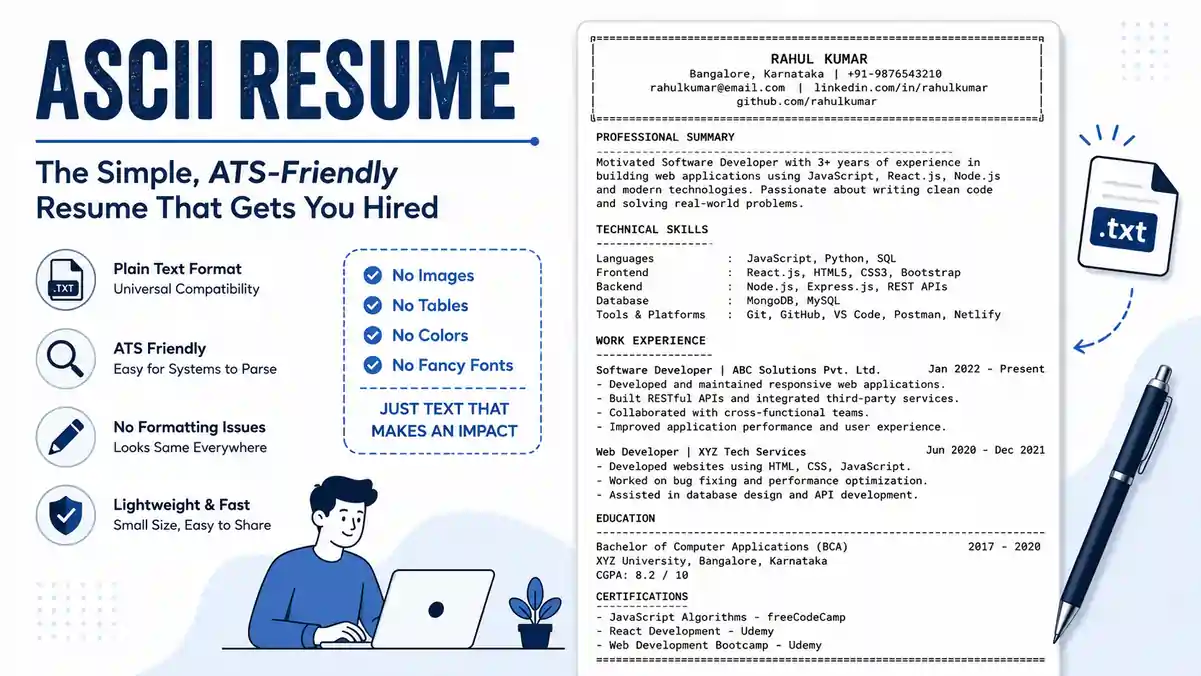
Ek ASCII resume (jise aksar Plain Text Resume bhi kehte hain) ek document hota hai jisme sirf standard text characters hote hain. Isme koi bhi rich formatting nahi hoti:
- No Bold (Lekin CAPITALS use kar sakte hain)
- No Italics
- No Colors
- No Images or Graphics
- No Tables
- No Complex Fonts
Aisa format usually .txt file mein save kiya jata hai. Iska main maqsad ye hai ki resume kisi bhi operating system (Windows, Mac, Linux) ya kisi bhi email client mein bina kisi formatting error ke khul sake.
Jab aap kisi ATS software mein resume upload karte hain jo sirf text read kar sakta hai, ya jab aap LinkedIn ya Naukri.com par resume paste karte hain, toh ASCII format sabse safe aur reliable hota hai.
ASCII vs. Plain Text: Why Tech Companies Still Use the Old Term

Bahut saare guides "ASCII resume" aur "Plain text resume" ko ek hi cheez bolkar aage badh jaate hain — technically ye galat nahi hai, lekin ek important nuance miss ho jaata hai jo aapko pata hona chahiye, especially agar aap IT ya coding roles mein apply kar rahe hain.
ASCII: A Strict, Limited Character Set
ASCII original standard sirf 128 characters ko define karta hai — basic English letters (A-Z, a-z), numbers (0-9), aur kuch standard punctuation marks (., ,, !, ?, -, etc.). Ismein ₹ symbol, em-dash (—), smart quotes (" "), emojis, ya kisi bhi non-English character ke liye jagah nahi hai.
Plain Text: A Looser, Modern Term
"Plain text" thoda broader term hai. Aaj kal jab koi ".txt" file save karta hai, toh usually wo UTF-8 encoding use karta hai, jo ASCII se kahi zyada characters support karta hai — including ₹ symbol, accented letters, aur even emojis. Isliye "Plain text" technically ASCII se zyada flexible hai.
Toh Phir Recruiters "ASCII" Kyun Bolte Hain?
Yahi confusion ka main point hai. Tech aur coding job applications mein "ASCII resume" term aaj bhi use hota hai kyunki kuch legacy systems aur older parsers abhi bhi strict ASCII-only logic par chalte hain — jaise purane government portals, kuch banking sector ke internal HR tools, aur command-line based application systems. Agar aap aisi jagah apna resume paste karte hain jismein ₹ symbol, em-dash, ya curly quotes hain, toh wo characters garbled box (□) ya question mark (?) ki tarah dikh sakte hain — jo bahut unprofessional lagta hai.
Practical Rule for Indian Job Seekers
| Scenario | Safe Approach |
|---|---|
| Tech/coding job applications, legacy govt. portals, command-line systems | Strict ASCII — only basic English keyboard characters. No ₹, no em-dash, no curly quotes. |
| General corporate email, Naukri.com paste box, LinkedIn bio | Plain Text (UTF-8) is fine — thodi zyada flexibility hai, lekin phir bhi simple rakhein. |
Agar aapko confusion ho ki kahan strict rehna hai, toh safest practice yahi hai: hamesha ASCII-safe characters use karein, chahe situation kuch bhi ho. Isse aap har system mein safe rahenge — chahe wo naya ho ya 15 saal purana legacy tool.
When Should You Use an ASCII Resume?
India mein job market thoda diverse hai. Kahi aapko PDF bhejna hota hai, toh kahi text box. ASCII resume kab use karein, ye samajhna zaroori hai:
1. Online Application Portals aur ATS
Bahut saare bade MNCs (jaise TCS, Infosys, Accenture) aur government portals (jaise SSC, UPSC) ke application forms mein resume upload karne ke bajaye, aapko apna resume ek text box mein paste karna padta hai. Agar aapne wahan Word file paste kar diya, toh formatting toot jayegi, aur resume ki saari structure kharab ho jayegi. ASCII resume is situation mein perfect hai.
2. Email Applications
Agar aap kisi recruiter ko direct email bhej rahe hain aur attachment ka option nahi hai, ya aapko attachment flag hone ka darr hai, toh aap apna resume email body mein paste kar sakte hain. ASCII format ensure karta hai ki email client (Gmail, Outlook) aapke resume ko kharab na dikhaye. Ye specifically useful hai Indian startup ecosystem mein, jahan kai founders ya HR managers attachments ko spam filter ki wajah se block kar dete hain — wahan resume seedha email body mein paste karna zyada professional aur reliable approach hota hai.
3. Enterprise ATS Platforms (Workday aur Similar Systems)
Bangalore, Mumbai, aur Hyderabad mein based bahut saare bade MNCs apna hiring process enterprise-level ATS platforms jaise Workday ke through chalate hain. In platforms mein "Cover Letter" ya "Additional Information" jaise text-box fields hote hain jahan aapko content directly paste karna padta hai — yahan bhi rich-formatted Word content paste karne se broken bullets, weird spacing, ya hidden characters aa jaate hain. ASCII-formatted content yahan bhi sabse safe choice hota hai.
4. Technical and Coding Jobs
Agar aap software developer, data analyst, ya system administrator hain, toh kuch companies specifically ASCII resume maangti hain. Unhe lagta hai ki agar aap basic text handling kar sakte hain, toh aap technical discipline mein ache honge.
5. LinkedIn and Social Media Profiles
LinkedIn par kabhi-kabhi "Featured" section ya bio mein text paste karna padta hai. Wahan bhi simple text format best rehta hai.
6. Legacy Systems
Kuch purane HR systems abhi bhi aise hain jo modern PDFs ko sahi se parse nahi kar paate. ASCII resume unke liye 100% compatible hai.
ASCII Resume vs PDF vs Word: Kaun Sa Best Hai?
Decision lene se pehle, in teen formats ke beech ke fark ko samajhna zaroori hai.
| Feature | ASCII / Plain Text (.txt) | PDF (.pdf) | Microsoft Word (.docx) |
|---|---|---|---|
| Formatting | None (Only text) | Fixed, Professional | Editable, Rich |
| ATS Compatibility | 100% (Best for paste) | High (Modern ATS) | Medium (Can break) |
| Visual Appeal | Low (Very Basic) | High | High |
| File Size | Very Small (<10 KB) | Medium | Medium |
| Best For | Text boxes, Email bodies | Final submission, Portals | Editing, Printing |
| Readability | Good if spaced well | Excellent | Good |
Pro Tip: Agar aapko online form mein paste karna hai, toh ASCII use karein. Agar aapko direct attachment bhejni hai, toh PDF best hai. PDF resume banane ke liye aap ResumeEra.xyz ka use kar sakte hain jo free mein professional PDF generate karta hai.
The ATS vs. Human Balance: Why "Bot-Friendly" Isn't Enough
Yahan par sabse badi galti hoti hai jo most guides nahi batatein: log sirf "ATS ko kaise pass karein" sochte hain, aur "human recruiter ko kaisa lagega" bhool jaate hain. Lekin reality ye hai — agar aapka resume ATS se pass ho gaya, toh ek insaan bhi use padhega. Aur agar wo resume ek "wall of text" lagta hai bina kisi visual break ke, toh wo insaan use 3 seconds mein hi reject kar dega, chahe ATS score kuch bhi ho.
The Problem with Pure ATS Optimization
Bahut log sochte hain ki ASCII resume mein sirf keywords thok dena kaafi hai. Lekin agar puri resume ek continuous paragraph ki tarah dikhti hai, bina spacing ke, bina clear sections ke, toh human recruiter ke liye scan karna namumkin ho jaata hai.
Bad Example (ATS-only thinking, human-unfriendly):
John Doe Software Engineer Java Python SQL 5 years experience Tech Solutions Bangalore led team built microservices reduced costs optimized database IIT Bombay BTech Computer Science skills include Java Python React Docker Kubernetes
Good Example (ATS-friendly AND human-readable):
JOHN DOE
Software Engineer | Bangalore | john.doe@email.com

WORK EXPERIENCE
--------------------------------------------------------------------------------
Senior Java Developer | Tech Solutions Pvt Ltd | Jan 2021 - Present
- Led a team of 5 developers to build a microservices architecture
- Optimized SQL queries which reduced database load by 35%

EDUCATION
--------------------------------------------------------------------------------
B.Tech Computer Science | IIT Bombay | 2014 - 2018
The Balance Checklist
2026 ke modern ATS systems reasonable spacing aur structure ko easily handle kar lete hain — isliye aapko visual hierarchy ko bilkul chhodne ki zaroorat nahi hai. Balance banane ke liye:
- ALL CAPS headings use karein har major section ke liye (machine aur human dono easily identify kar lete hain)
- Blank lines chhodein sections ke beech mein — ye "breathing room" deta hai aapki resume ko
- Dividers (
===,---) use karein visual separation ke liye, jo ATS ignore kar deta hai lekin human eye ko guide karta hai - Consistent bullet style rakhein (hamesha
-ya hamesha*, mix mat karein) - Related information ko group karein — jaise sab dates ek consistent position par hon
Yaad rakhein: ATS sirf gatekeeper hai, final decision-maker nahi. Asli goal hai ek aisa document banana jo machine ke through pass ho jaaye aur insaan ko bhi turant samajh aa jaaye.
How to Create an ASCII Resume: Step-by-Step Guide
Ek achha ASCII resume banane ke liye aapko Microsoft Word ki advanced features nahi chahiye. Bas thoda discipline aur sahi tools chahiye. Niche diye gaye steps follow karein:
Step 1: Sahi Tool Chunein
Sabse pehle, ek simple text editor open karein.
- Windows: Notepad (Sabse best aur simple)
- Mac: TextEdit (Settings mein "Plain Text" mode on karein)
- Online: Koi bhi online notepad tool.
Important: Microsoft Word use karte waqt dhyan rakhein ki Word "smart quotes" aur automatic bullets add kar deta hai jo ASCII mein nahi chahiye. Isliye Notepad sabse safe option hai.
Step 2: Line Length aur Margins Set Karein
ASCII resume mein margins automatic hote hain, lekin aapko har line ko 65-70 characters tak limit karni chahiye.
- Agar line bahut lambi hogi, toh mobile par padhne mein dikkat hogi.
- Agar line choti hogi, toh resume bahut lamba lagega.
- Rule: Right side par text ko force-justify mat karein. Bas natural line breaks use karein.
Step 3: Formatting ke Liye ASCII Characters Use Karein
Kyunki aap bold ya italic nahi kar sakte, aapko apne headings aur sections ko highlight karne ke liye special characters use karne honge:
- Headings: Pura heading ALL CAPS mein likhein (e.g., WORK EXPERIENCE).
- Dividers: Sections ke beech mein line banane ke liye
===,---, ya***use karein. - Bullet Points: Regular bullets (•) kaam nahi karenge. Unki jagah
-(hyphen),*(asterisk), ya+(plus sign) use karein. - Alignment: Hamesha text ko Left Align rakhein. Center ya Right align tab aur spaces use karein toh formatting toot sakti hai.
Step 4: Content Structure Banayein
Apne resume ko standard sections mein divide karein:
- Contact Information (Name, Phone, Email, LinkedIn URL)
- Professional Summary (Ya Objective, agar fresher hain)
- Work Experience (Reverse Chronological order)
- Education
- Skills (Technical and Soft Skills)
- Certifications / Projects (Optional)
Aap apne resume ko tailor karne ke liye ResumeEra ke guides follow kar sakte hain jahan aap job description ke hisaab se keywords add kar sakte hain.
Step 5: Save as .txt
Jab content ready ho jaye, toh file ko Save As karein aur format Plain Text (.txt) select karein.
- File name professional rakhein:
FirstName_LastName_Resume.txt - Encoding: UTF-8 select karein taaki Indian characters (agar koi use kar rahe hain) sahi dikhain.
The Tab Key Disaster: Why It Breaks Your Resume (With Examples)
Ye section best practices mein chhupi hui ek line nahi honi chahiye — ye sabse common reason hai ki kyun ek perfectly written resume Notepad mein khulte hi bilkul "tooti hui" lagti hai. Chaliye dekhte hain exactly kya hota hai.
Tab Key Kyun Problem Create Karta Hai?
Jab aap Word ya Google Docs mein Tab key press karte hain (jaise job title ke baad date ko right side rakhne ke liye), toh wo editor ek fixed visual width assume karta hai. Lekin Tab character ka actual width fixed nahi hota — ye us application ke settings par depend karta hai jismein file khul rahi hai. Notepad ka tab-width Word se alag hota hai, aur email client ka tab-width Notepad se alag hota hai.
Result ye hota hai: jo alignment aapko Word mein perfect dikh rahi thi, wo Notepad ya recruiter ke email client mein khulte hi completely misaligned ho jaati hai.
Visual Example: Tab vs Space
❌ WRONG — Using Tab Key (jaisa Word mein dikhta hai):
Senior Developer    [TAB]    Jan 2021 - Present
Marketing Lead   [TAB]    Mar 2019 - Dec 2020
❌ Jab same file Notepad mein khulti hai (broken):
Senior Developer        Jan 2021 - Present
Marketing Lead   Mar 2019 - Dec 2020
Notice karein — dono lines ka alignment alag-alag jagah toot gaya hai. Recruiter ko ye instantly "careless" ya "unprofessional" lagta hai, chahe content kitna bhi achha ho.
✅ CORRECT — Using a Separator Instead of Alignment:
Senior Developer | Tech Solutions Pvt Ltd | Jan 2021 - Present
Marketing Lead | StartUp India | Mar 2019 - Dec 2020
Important Nuance: Even Spaces Can Fail
Bahut guides bolte hain "Tab ki jagah Spaces use karein" — ye sahi advice hai, lekin pura sach nahi hai. Agar aap manually spaces count karke right-align karne ki koshish karte hain, aur receiving system monospace font use nahi karta (yani har character ki width same nahi hai), toh wahan bhi misalignment ho sakti hai.
Safest Rule: Right-side alignment ki koshish hi mat karein. Iske bajaye, ek consistent separator character (| ya -) use karke sab info ko ek hi line mein left-to-right sequence mein likhein, jaisa upar "CORRECT" example mein dikhaya gaya hai. Ye approach kisi bhi device, font, ya application mein bilkul same dikhega.
The Copy-Paste-Clean Workflow: Convert Your Existing Resume in 5 Minutes
Agar aapke paas already ek Word ya Canva resume hai, toh use bilkul scratch se phir se likhne ki zaroorat nahi hai. Yahan ek direct, copy-paste workflow diya gaya hai jo aapka existing content preserve karte hue ek clean ASCII version bana dega — bina kisi content loss ke.
Step 1: Select aur Copy Karein
Apna existing Word ya Canva resume open karein. Pura content select karein (Ctrl+A) aur copy karein (Ctrl+C).
Step 2: Notepad Mein Paste Karein (Sirf Notepad, Word/Google Docs Nahi)
Notepad open karein aur paste karein (Ctrl+V). Yahi sabse important step hai — Notepad apne aap se saari rich formatting strip kar deta hai (bold, colors, fonts, images sab gayab ho jaayenge), aur sirf raw text reh jaayega.
Step 3: Hidden Characters Ko Dhoondh Kar Saaf Karein
Paste karne ke baad, ye specific cheezein survive kar jaati hain jo aapko manually fix karni hongi:
| Problem Character | Replace With |
|---|---|
| Tab characters (invisible gaps) | Delete aur ek consistent separator (| ya -) use karein |
| Smart/curly quotes (" " ' ') | Straight quotes (" ') |
| Em-dash (—) ya en-dash (–) | Simple hyphen (-) |
| Bullet symbols (•, ➤, ✓) | Hyphen (-) ya asterisk (*) |
| Broken boxes/question marks (□, ?) | Delete — ye usually image ya icon placeholders the |
Step 4: Structure Manually Wapas Add Karein
Ab jab content clean ho gaya hai, structure add karein:
- Section headings ko ALL CAPS mein type karein
- Main header ke neeche aur har major section ke beech
===ya---divider line add karein - Sections ke beech blank lines chhodein spacing ke liye
Step 5: Line Length Check Karein
Har line ko scan karein — agar koi line 70 characters se zyada lambi hai, manually Enter press karke use break karein.
Step 6: Save Karein
File > Save As → File type: Plain Text (.txt) → Encoding: UTF-8 → File name: FirstName_LastName_Resume.txt
Step 7: Final Test
File ko close karke wapas fresh open karein, aur ek baar Gmail compose box mein bhi paste karke dekhein ki sab clean dikh raha hai ya nahi. Agar kuch off lag raha hai, Step 3 wapas repeat karein.
Is workflow ko follow karne se aapka original content — saari achievements, numbers, aur details — bilkul preserve rehta hai, sirf packaging change hoti hai.
ASCII Resume Template (Copy-Paste Ready)
Niche ek ready-to-use ASCII resume template diya gaya hai. Aap isse copy karke Notepad mein paste karein aur apni details bharein.
================================================================================
                                JOHN DOE
           Bangalore, Karnataka | +91-9876543210 | john.doe@email.com
                     linkedin.com/in/johndoe | github.com/johndoe
================================================================================

PROFESSIONAL SUMMARY

Results-oriented Software Engineer with 5+ years of experience in developing
scalable web applications using Java and Python. Proven track record of
reducing server costs by 20% and improving application speed. Seeking to
leverage technical expertise at a leading tech firm in Bangalore.

--------------------------------------------------------------------------------
WORK EXPERIENCE
--------------------------------------------------------------------------------

Senior Java Developer | Tech Solutions Pvt Ltd, Bangalore | Jan 2021 - Present

- Led a team of 5 developers to build a microservices architecture for a
  fintech product, handling 1M+ daily transactions.
- Optimized SQL queries which reduced database load by 35% and improved
  user response time.
- Implemented CI/CD pipelines using Jenkins, reducing deployment time from
  2 hours to 15 minutes.
- Mentored junior developers and conducted code reviews to maintain high
  code quality standards.

Junior Developer | StartUp India, Pune | June 2018 - Dec 2020

- Developed and maintained RESTful APIs for the company's mobile application.
- Collaborated with the design team to implement responsive UI components.
- Fixed over 200+ critical bugs before product launch, ensuring 99.9% uptime.

--------------------------------------------------------------------------------
EDUCATION
--------------------------------------------------------------------------------

Bachelor of Technology (Computer Science) | IIT Bombay | 2014 - 2018
- CGPA: 8.5/10
- Relevant Coursework: Data Structures, Algorithms, Database Management

--------------------------------------------------------------------------------
TECHNICAL SKILLS
--------------------------------------------------------------------------------

Languages: Java, Python, JavaScript, SQL
Frameworks: Spring Boot, React.js, Django
Tools: Git, Jenkins, Docker, Kubernetes
Databases: MySQL, MongoDB, PostgreSQL

--------------------------------------------------------------------------------
CERTIFICATIONS
--------------------------------------------------------------------------------

- AWS Certified Solutions Architect - Associate (2023)
- Oracle Certified Professional: Java SE 11 Developer (2022)

--------------------------------------------------------------------------------
PROJECTS
--------------------------------------------------------------------------------

E-Commerce Platform: Built a full-stack e-commerce site using MERN stack.
Feature: Integrated Razorpay for payments and implemented search filters.
Link: github.com/johndoe/ecommerce

--------------------------------------------------------------------------------
Is template ko use karte waqt dhyan rakhein ki har line 70 characters se zyada na ho. Agar aapko lagta hai ki aapka content bahut complex hai, toh pehle ek Fresher Resume Format guide padh kar structure samajh lein.
ASCII Resume Best Practices: Tips for Success
Sirf text likhna kaafi nahi hai. Aapko ise readable aur professional banana hoga. Ye kuch expert tips hain:
1. Special Characters se Bachen
Kuch characters alag-alag computers par alag dikhte hain ya garbarate hain.
- Avoid: Em-dashes (—), smart quotes (" "), special bullets (•).
- Use: Hyphens (-), straight quotes (" "), asterisks (*).
2. Contact Info Clear Rakhein
ASCII resume mein aapka email aur phone number sabse pehle dikhna chahiye. Koi bhi fancy header ya photo use na karein. Sirf text mein likhein.
- Phone number ka format:
+91-XXXXXXXXXX(International format best hai). - LinkedIn URL: Full URL paste karein (short links jaise
bit.lyavoid karein).
3. Keywords ka Dhyan Rakhein
Kyunki ASCII resume ATS ke liye optimized hota hai, isme keywords ka hona zaroori hai. Job description mein jo skills mention hain (jaise "Python", "Project Management"), unhe apne skills section mein explicitly mention karein.
Aap ATS Keywords Guide check kar sakte hain taaki aap sahi terms use karein.
4. White Space ka Use Karein
Bina formatting ke, resume thoda "dense" lag sakta hai. Isse bachne ke liye:
- Har section ke beech mein kam se kam 2 empty lines chhodein.
- Sections ke beech mein
===ya---line use karein visual break ke liye.
Common Mistakes to Avoid in ASCII Resume
Indian job seekers aksar ye galtiyan karte hain jo unhe interview se door le jati hain:
1. Formatting ka Khel (The "Tab" Trap)
Jaisa ki upar detail mein bataya gaya, Word se copy-paste karte waqt hidden tabs aate hain. Hamesha file ko pehle Notepad mein paste karein, phir wahan se clean karke final save karein.
2. Bina Context ke Abbreviations
ASCII resume mein chhote sections hote hain. Agar aapne koi abbreviation use kiya hai (jaise "MBA", "B.Tech"), toh ensure karein ki wo industry standard ho. Koi bhi personal abbreviation (jaise "C.A.") ka full form likhna behtar hai pehli baar mein.
3. Overstuffing Content
Kyunki formatting nahi hai, log sochte hain ki wo zyada text daal denge. Nahi! ASCII resume mein conciseness (sanikta) hi king hai. Sirf wo likhein jo zaroori hai. Long paragraphs se bachen; bullet points hi best hain.
4. File Name Ki Galti
File ka naam resume.txt ya my_resume.txt rakhna avoid karna chahiye.
- Correct Name:
Rahul_Sharma_Senior_Architect.txt - Isse recruiter ko turant pata chal jata hai ki file kiski hai.
Testing Your ASCII Resume
Upload karne se pehle, apne resume ko test zaroor karein:
- Different Devices: Apne resume ko mobile aur desktop dono par open karein. Check karein ki lines break ho rahi hain ya nahi.
- Different Email Clients: Apne resume ko apne hi email ID par bhejein (Gmail, Outlook, Yahoo). Dekhein ki email body mein formatting kaisi dikhti hai.
- Copy-Paste Test: Apne resume ko copy karein aur ek blank text box (jaise Google Docs ka text box) mein paste karein. Agar formatting toot rahi hai, toh wapas jayein aur spaces adjust karein.
Agar aapko lagta hai ki aapka ASCII resume abhi bhi thoda awkward lag raha hai, toh aap Resume Checklist 2026 use karke ek last check zaroor karein.
ASCII Resume for Indian Job Market
India mein job application process thoda unique hai. Yahan kuch specific scenarios hain:
- Naukri.com / Monster: In portals par aksar "Upload Resume" aur "Paste Resume" dono options hote hain. Agar aap "Paste" select karte hain, toh ASCII format hi use karein.
- Enterprise MNCs (Workday-based Hiring): Bangalore, Mumbai, aur Hyderabad mein bahut saare bade MNCs apna hiring process Workday jaise enterprise ATS platforms se chalate hain. Yahan bhi text-box fields (jaise summary ya cover note) mein ASCII-clean content paste karna safest approach hai, taaki hidden formatting characters parsing mein dikkat na karein.
- Government Jobs: SSC, Railways, aur Bank exams ke liye jab online form bharna hota hai, toh wahan text box mein details dalein. Wahan ASCII format ki zaroorat padti hai.
- Startups: Indian startups aksar founders ko direct email karte hain. Wahan attachment ki jagah email body mein simple text resume bhejna professional lagta hai, khaas kar jab attachments spam filters ki wajah se block ho jaate hain.
- Freelancing: Agar aap Upwork ya Fiverr par apply karte hain, toh cover letter mein thoda text paste karna padta hai. Wahan bhi ASCII style help karta hai.
People Also Ask
1. Kya ASCII resume ATS friendly hai?
Haan, ASCII resume sabse zyada ATS friendly hota hai kyunki isme koi complex formatting nahi hoti jo ATS software ko confuse kar sake. Yeh purane aur naye dono tarah ke ATS systems ko easily read hota hai.
2. Kya main ASCII resume mein bold aur italic use kar sakta hoon?
Nahi, ASCII format mein bold, italic, colors, ya fonts change nahi kiye ja sakte. Aapko headings ke liye ALL CAPS aur important points ke liye symbols (jaise * ya -) ka use karna padega.
3. ASCII resume banane ke liye kaun sa software best hai?
Sabse best software Notepad (Windows) ya TextEdit (Mac - Plain Text mode) hai. Microsoft Word use kar sakte hain lekin wahan se save karte waqt "Plain Text (.txt)" format select karna zaroori hai.
4. Kya ASCII resume mein photo lagani chahiye?
Nahi, ASCII resume mein photo, images, ya graphics lagana possible nahi hai. Yeh sirf text-based format hai. India mein bhi ab most companies photo-free resumes prefer karti hain, khaas kar ke tech aur corporate roles ke liye.
5. Kya main ASCII resume ko PDF mein convert kar sakta hoon?
Haan, aap kisi bhi online tool ya Notepad se PDF converter ka use karke .txt file ko .pdf mein badal sakte hain. Lekin dhyan rakhein ki PDF banne ke baad bhi formatting simple hi rahegi.
6. ASCII resume mein line length kitni honi chahiye?
Har line ko 65 se 70 characters tak limit karna behtar hai. Agar line zyada lambi hogi, toh mobile users ko padhne mein dikkat hogi aur formatting toot sakti hai.
7. Kya ASCII resume freshers ke liye bhi suitable hai?
Haan, freshers ke liye bhi ASCII resume suitable hai, khaas kar ke agar wo internships ya entry-level jobs ke liye apply kar rahe hain jahan simple text format maanga gaya ho.
8. ASCII resume aur Plain Text resume mein kya antar hai?
Technically, ASCII sirf 128 basic characters tak limited hai, jabki Plain Text (UTF-8) thoda zyada characters support karta hai (jaise ₹ symbol). Lekin practical resume-writing context mein, dono terms almost same maane jaate hain — dono ka matlab hai "bina rich formatting ke simple text." Tech/coding roles aur legacy government portals ke liye strict ASCII safest hai; general email ke liye plain text bhi chalega.
9. Kya Notepad mein paste karne se hamesha formatting clean ho jaati hai?
Notepad rich formatting (bold, colors, fonts) toh strip kar deta hai, lekin tab characters, smart quotes, aur special bullet symbols kabhi-kabhi survive kar jaate hain. Isliye paste karne ke baad bhi ek manual scan zaroor karein in hidden characters ke liye.
Conclusion
ASCII resume shayad aaj ke fancy design world mein purana lagta ho, lekin ye functional aur reliable hai. Jab aap online portals, email applications, ya technical job applications ke liye apply karte hain, toh ASCII resume aapka sabse bharosemand dost ban sakta hai.
Yaad rakhein, resume ka maqsad formatting dikhana nahi, balki aapki skills aur experience ko clear tarike se batana hai. ASCII resume isi maqsad ko serve karta hai — bina kisi distraction ke, lekin smart spacing aur dividers ke saath jo isse human-readable bhi banate hain.
Agar aapko lagta hai ki ASCII resume banane mein thodi confusion hai, toh pehle ek Standard Resume banayein, aur phir upar diye gaye Copy-Paste-Clean Workflow follow karke usse plain text format mein convert karein. ResumeEra.xyz par aapko free resources milenge jo aapko professional resume banane mein madad karenge.
Aapka next job application ke liye taiyaar hain? Abhi apna ASCII resume banayein aur apply karein!
