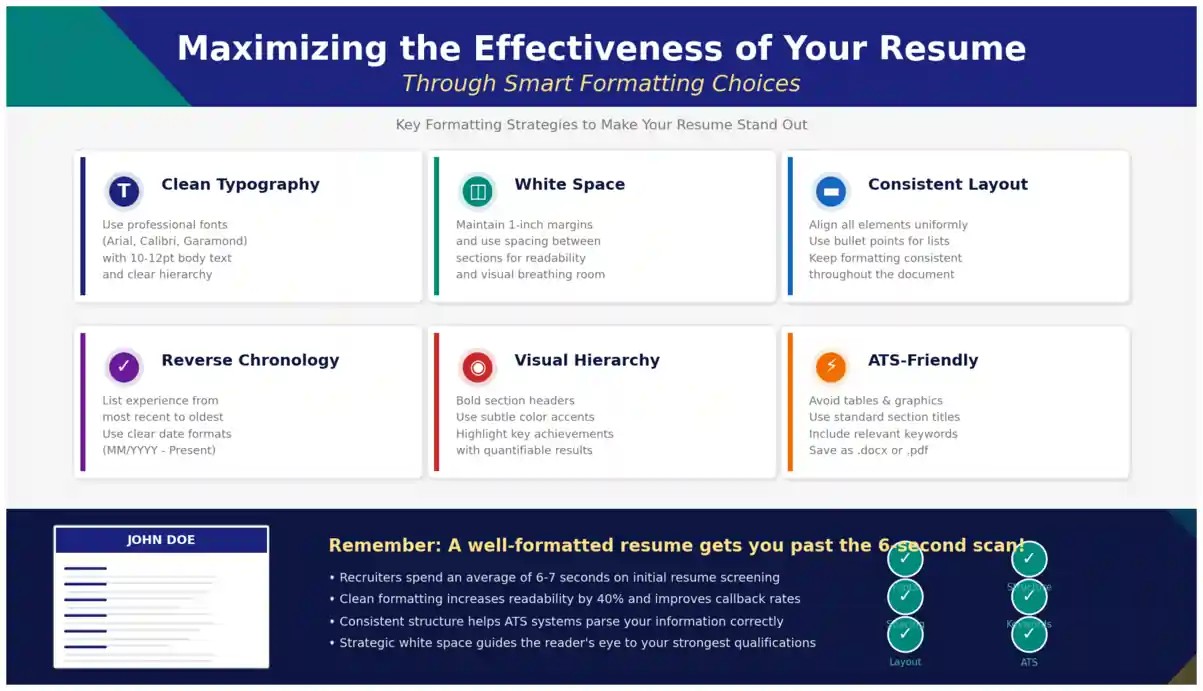
Your resume may have strong content, but if the formatting is cluttered, inconsistent, or difficult to scan, Indian recruiters will move on in seconds. On platforms like Naukri, LinkedIn, and company career portals, hiring managers and Applicant Tracking Systems (ATS) first judge how your information is presented before they read what you have written. Smart formatting is not about fancy graphics or colours. It is about clarity, hierarchy, and making your most relevant strengths impossible to miss. For freshers applying to TCS, Infosys, Wipro, or startups, and for experienced professionals targeting mid-career switches, the right layout, font choices, spacing, and file type can decide whether your resume is shortlisted or ignored. This guide breaks down practical formatting choices that work specifically for the Indian job market.
Why Resume Formatting Decides Shortlisting in India
Most Indian recruiters spend 6 to 8 seconds on an initial scan. In that window, they check your current role, total experience, key skills, education, and location. If your resume uses uneven margins, tiny fonts, dense paragraphs, or confusing section order, that information gets buried. Even if you are highly qualified, poor formatting creates friction and signals lack of attention to detail.
ATS software used widely in India, including systems integrated with Naukri RMS, Taleo, SAP SuccessFactors, and Zoho Recruit, adds another layer. These systems parse text from your resume to auto-fill candidate databases. When you use tables for layout, text boxes, images for headings, or headers and footers for contact details, the ATS often fails to read them correctly. Your skills may exist in the document but never reach the recruiter's search filters. A clean, text-based, single-column or simple two-column layout ensures the parser captures every keyword.
Good formatting also builds trust. Indian hiring managers often compare 50 to 200 resumes for one opening. A resume with consistent alignment, clear headings, and logical flow looks professional and makes comparison easy. It shows you understand business communication. For example, a fresher from Pune applying for a software developer role and an experienced sales manager from Delhi both benefit from the same principle: make the recruiter's job easier, and your chances improve immediately.
- First impression: Neat spacing and readable fonts signal professionalism before a single word is read.
- Scan-ability: Recruiters can locate experience, education, and skills without hunting.
- ATS accuracy: Simple formatting ensures your keywords for Java, Python, Digital Marketing, or GST are correctly indexed.
- Consistency: Uniform dates, bullet styles, and headings prevent confusion about your career timeline.
Recruiters in India often say: "If I cannot find your current designation and total experience in 10 seconds, I will not read further." Formatting is what makes those details instantly visible.
Choosing the Right Resume Format for Your Career Stage
The format is the overall structure of your resume. It determines what the recruiter sees first. In India, three formats are widely accepted. Your choice should depend on your experience level, career gaps, and whether you are changing industries. Templates from https://resumeera.xyz offer all three structures, so you can select without rebuilding from scratch.
1. Reverse-Chronological Format
This is the most preferred format by Indian recruiters and ATS. It lists your most recent job first, then moves backward. It highlights steady career progression and is ideal if you have continuous experience in the same field. For example, an IT professional with 4 years at Cognizant followed by 2 years at Accenture should use this format to show growth from Associate to Senior Associate. Education appears after experience for experienced candidates, while freshers can place education first. Use clear date ranges like "June 2021 - Present" and keep the layout single-column with bold job titles. This format works best for Naukri applications where recruiters filter by recent company and designation.
2. Functional Format
The functional format groups achievements by skill categories rather than by timeline. Instead of job-wise experience, you create sections like "Project Management," "Client Relations," or "Technical Skills" with bullet points under each. This format can help freshers with internships, freelancers, or candidates returning after a career break who want to emphasize abilities over chronology. However, most ATS in India and many recruiters view this format with caution because it hides employment history. If you have gaps or are switching from teaching to corporate training, use it carefully and always include a brief work history section at the bottom with company names, roles, and dates, so the ATS still captures your timeline.
3. Combination Format
The combination format merges both approaches. It starts with a strong skills summary or core competencies section, followed by detailed work experience in reverse-chronological order. This is highly effective for experienced professionals in India who want to showcase both domain expertise and career progression. For instance, a digital marketing manager with 7 years of experience can open with a "Core Competencies" grid listing SEO, Google Ads, Social Media Strategy, and Marketing Analytics, then detail roles at different agencies. This format satisfies ATS keyword scans at the top while giving recruiters the chronological story they expect. Keep the skills section text-based, not as icons or progress bars, which ATS cannot read.
Layout Principles That Pass ATS and Impress Recruiters
Once you choose a format, the layout details determine readability. Small decisions about fonts, spacing, and headings have a large impact on how your resume performs on Indian job portals and in email applications.
Fonts, Margins, and White Space
Stick to ATS-safe fonts that render correctly on all devices: Calibri, Arial, Verdana, Garamond, or Times New Roman. Use 10.5 to 12 points for body text and 14 to 16 points for your name at the top. Headings can be 12 to 14 points in bold. Avoid decorative fonts, and never use font sizes below 10 points to squeeze content onto one page. Recruiters reviewing resumes on mobile phones, which is common for LinkedIn applications, will struggle with tiny text.
Maintain margins of 0.6 to 1 inch on all sides. This creates white space that prevents the page from looking crowded. Use consistent line spacing of 1.0 to 1.15 and add 6 to 8 points of space between sections. For bullet points, use simple solid dots or hyphens, not arrows or checkmarks that may not parse correctly. Left-align all text. Justified alignment creates uneven gaps that reduce readability. If your resume exceeds one page, ensure the second page has at least half a page of content. For most freshers, one page is ideal. For professionals with 5+ years of experience, two pages are acceptable in India.
Section Order and Headings
Recruiters expect a predictable order. For experienced candidates, the ideal sequence is: Header with Contact Information, Professional Summary, Key Skills, Work Experience, Education, Certifications, and Additional Information. For freshers, place Education and Internships before Work Experience, and add Projects and Achievements.
Use standard heading titles that ATS recognizes: "Work Experience" instead of "My Journey," "Education" instead of "Academic Background," and "Skills" instead of "What I am Good At." Write headings in bold and slightly larger font, with a subtle line or extra spacing below to separate sections. Avoid placing headings inside coloured boxes or as images. Keep contact information in the main body of the document at the top, not in the header or footer section of Word, because many ATS ignore headers and footers entirely. Include your phone number, professional email, city and state, LinkedIn profile URL, and portfolio link if relevant.
PDF vs Word: What to Send on Naukri, LinkedIn and Company Portals
Choosing the correct file type is a critical formatting decision in India. Different platforms have different requirements, and sending the wrong format can distort your layout or block ATS parsing.
For most online applications, a text-based PDF is the safest choice. It preserves your fonts, spacing, and alignment exactly as you designed them, whether the recruiter opens it on a laptop, phone, or ATS dashboard. When you upload a PDF to Naukri or LinkedIn Easy Apply, the layout remains intact. However, ensure your PDF is created by exporting from Word or Google Docs as a text-based PDF, not as a scanned image. Scanned PDFs are unreadable by ATS.
Some large companies and consultancies in India specifically request a Word document (.docx) because their ATS parses Word files more accurately and recruiters may want to add comments. Always read the job posting carefully. If it says "Upload resume in DOC or DOCX," send Word. If no format is specified, send PDF. Never send both formats unless asked. Keep your file name professional: "Amit_Sharma_Resume_Marketing_Manager.docx" is far better than "Resume_Final2.pdf". Avoid special characters in file names.
| Feature | PDF (.pdf) | Word (.docx) | Best Use Case in India |
|---|---|---|---|
| Layout Preservation | Excellent, looks same on all devices | May shift if recruiter has different Word version or fonts | PDF for Naukri, LinkedIn, email to hiring manager |
| ATS Parsing | Very good if text-based, poor if scanned image | Excellent, most ATS parse Word easily | Word when job ad explicitly asks for DOC/DOCX |
| Editing Ease | Hard to edit without source file | Easy for recruiters to add notes | Word for consultancy submissions |
| File Size | Compact, easy to attach | Slightly larger, but still small | Both acceptable for portal uploads |
| Risk of Distortion | Very low | Medium if using columns, tables, or custom fonts | PDF preferred for design-sensitive layouts |
Templates from https://resumeera.xyz allow you to download in both PDF and Word formats, so you can keep both versions ready and send the appropriate one without reformatting.
Step-by-Step Process to Format Your Resume Perfectly
Follow this practical workflow to format your resume from scratch or to fix an existing document before you apply on Naukri or LinkedIn.
- Select a clean template: Choose a simple, single-column template with clear headings. Avoid templates with heavy graphics, photos, or multiple text boxes. Download from https://resumeera.xyz in Word format for easy editing.
- Set page setup first: Set margins to 0.7 inch, font to Calibri or Arial 11pt, and line spacing to 1.1. Define heading styles before typing content to ensure consistency.
- Build the header correctly: Place your full name in 16pt bold at the top, followed by phone, email, city, LinkedIn URL, and portfolio on one or two lines. Keep it in the main document body, not in the Word header section.
- Order sections strategically: For experienced professionals, place Summary, Skills, Experience, Education. For freshers, place Education, Internships, Projects, Skills. Use standard heading names that ATS can identify.
- Format experience with bullets: For each role, write Company Name, Location, Job Title, and Dates on one or two lines in bold. Below, use 3 to 5 bullet points starting with action verbs and including numbers where possible, for example, "Increased sales by 22% in 6 months."
- Optimize for ATS keywords: Mirror keywords from the job description naturally. If the posting mentions "Tally, GST, Financial Reporting," include those exact phrases in your Skills and Experience sections without keyword stuffing.
- Export and test: Save as both DOCX and text-based PDF. Open the PDF on your phone to check readability. Copy-paste the entire text into Notepad to see what an ATS will read. If the pasted text is jumbled, fix tables or columns. Test file name and keep it under 30 characters with underscores.
Common Formatting Mistakes That Cost Interviews in India
Even strong candidates lose opportunities due to avoidable formatting errors. Indian recruiters often reject resumes not for lack of skill, but because the document looks unprofessional or fails ATS checks.
One frequent mistake is using overly designed templates downloaded from free sites that rely on tables, text boxes, and icons. These look attractive but break inside ATS. Skill bars showing "85% in Communication" or star ratings are meaningless to both software and recruiters. Replace them with simple bullet lists of skills. Another error is inconsistent date formatting. Writing "Jan 2022 - March 2023" in one place and "01/22 - 03/23" in another confuses both human readers and parsers. Choose one format, like "Jan 2022 - Mar 2023," and use it everywhere.
Many freshers make the mistake of adding a photograph, date of birth, father's name, or full home address at the top. Unless you are applying for roles where a photo is standard, such as cabin crew or acting, this wastes valuable space and can introduce bias. Keep personal details minimal. Similarly, using headers and footers for contact details, page numbers, or LinkedIn links is risky because many ATS completely skip content in those areas. Always keep critical information in the main body.
Other costly errors include dense paragraphs instead of bullets, which make scanning difficult, and using coloured backgrounds or watermarks that reduce contrast. Stick to black text on a white background with one subtle accent colour for headings if needed. Finally, never submit a resume with spelling inconsistencies, mixed bullet styles, or uneven spacing between sections. Before uploading to Naukri, zoom out to 70% view. If the page looks balanced with clear white space and aligned sections, your formatting is on track. If it looks crowded or lopsided, increase spacing and reduce content.
Formatting Tips for Freshers vs Experienced Professionals
Formatting needs differ based on career stage, and Indian recruiters have different expectations for each group.
For freshers and recent graduates, the focus should be on education, internships, projects, and skills. Place your B.Tech, B.Com, MBA, or other degree at the top after the summary, with university name, location, year of passing, and CGPA or percentage if it is strong. Follow with internships, academic projects, and certifications. Use 3 to 4 bullet points per project describing your role, tools used, and outcome. For example, "Built an e-commerce website using React and Node.js for final year project, tested with 50 users." Keep the resume to one page. Recruiters hiring for fresher roles at TCS NQT, Infosys SP, or Wipro Elite expect concise, one-page resumes that highlight learnability and basic technical skills.
For experienced professionals with 3 to 15 years of experience, the resume can extend to two pages. Lead with a 3 to 4 line professional summary tailored to the target role, then a key skills section that mirrors the job description. Your work experience should dominate the first page. Quantify achievements with Indian context where possible, such as "Managed a team of 12 across Mumbai and Bangalore," "Handled portfolio of 45 clients with annual billing of Rs. 2.5 Crore," or "Reduced process time by 30% by automating Excel reports." Use bold for company names and job titles to create a clear hierarchy. If you have frequent job changes, ensure dates are clearly visible and consider adding a brief reason for moves only if it adds clarity, otherwise let the achievements speak. For senior roles, you can add a separate section for Leadership, Awards, or Publications at the bottom of page two.
Both groups should ensure LinkedIn profile formatting matches the resume. Recruiters often cross-check Naukri resumes with LinkedIn. Consistent job titles, dates, and skills across both platforms build credibility.
Frequently Asked Questions About Resume Formatting
What is the best resume format for ATS in India?
The reverse-chronological format with a simple single-column layout, standard headings, and text-based PDF or DOCX file is best for ATS in India. It ensures systems like Naukri RMS, Taleo, and SAP SuccessFactors can correctly parse your work history, education, and skills without errors caused by tables or graphics.
Should I use a one-page or two-page resume for jobs in India?
Freshers and professionals with less than 5 years of experience should use a one-page resume. If you have 5 or more years of experience, multiple roles, or significant projects and certifications, a two-page resume is acceptable and common in India. Ensure the second page contains substantial information, not just two or three lines.
Is PDF or Word better for applying on Naukri and LinkedIn?
For Naukri and LinkedIn, a text-based PDF is generally better because it preserves your layout on all devices. However, if the job posting specifically asks for Word or DOCX, send Word. Keep both versions ready from https://resumeera.xyz and use the format requested in the advertisement.
Which fonts and font sizes are safest for Indian recruiters?
Use ATS-safe fonts like Calibri, Arial, Verdana, or Garamond. Keep body text at 10.5 to 12 points, your name at 14 to 16 points, and headings at 12 to 14 points bold. Avoid decorative fonts and do not go below 10 points, as it becomes unreadable on mobile screens.
Do I need to include a photo, date of birth, or address on my resume?
No, you do not need a photo, date of birth, father's name, or full address for most corporate jobs in India. Include only your phone number, professional email, city and state, and LinkedIn URL. Add a photo only if the role specifically requires it, such as hospitality, aviation, or modelling.
How do I make my resume look good on mobile phones?
Use a single-column layout, left alignment, 11pt font, and sufficient white space. Avoid narrow columns and tiny fonts. Export as PDF and test by opening the file on your phone. If you can read everything without zooming horizontally, the formatting is mobile-friendly, which is important since many recruiters screen LinkedIn applications on phones.
Can I use colours and graphics in my resume for India?
Use colour sparingly. Black text on white background with one muted accent colour for headings or lines is sufficient. Avoid bright backgrounds, skill progress bars, icons, and infographics. These elements often fail ATS parsing and distract recruiters from your actual achievements.
A well-formatted resume does not just look professional, it actively helps you get shortlisted. By choosing the right format for your career stage, using clean fonts and spacing, ordering sections logically, and sending the correct file type for each platform, you remove barriers between your skills and the recruiter. Indian employers on Naukri, LinkedIn, and direct portals receive hundreds of applications, and the resumes that are easiest to scan and parse rise to the top. Use a simple, ATS-friendly template from https://resumeera.xyz, apply the steps above, and review your document on both desktop and mobile before you apply. Smart formatting ensures your experience, education, and strengths are seen clearly, giving your content the chance it deserves to secure an interview.
