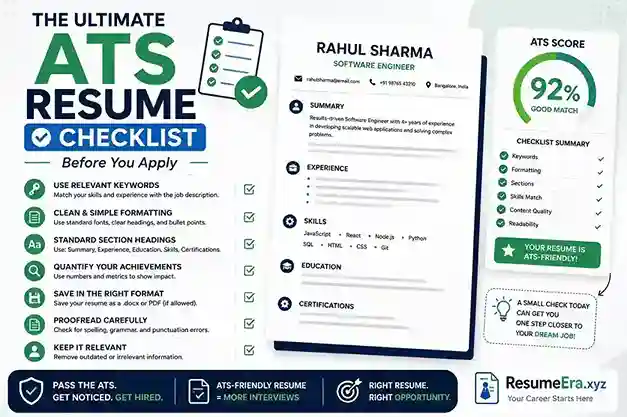
Applying to jobs on Naukri, LinkedIn, or a company career portal in India feels simple — upload your resume and wait for a call. In reality, your resume is first read by software, not a human. Over 75% of large Indian employers, including IT services, banks, startups, and manufacturing firms, use an Applicant Tracking System (ATS) to filter resumes before a recruiter ever sees them. If your formatting is messy, your keywords do not match the job description, or your file cannot be parsed, you get auto-rejected even if you are qualified. This checklist gives you a practical, step-by-step system to make your resume ATS-proof before you apply, whether you are a fresher from Pune applying for your first analyst role or an experienced professional in Bengaluru targeting a product manager position.
Why Most Resumes Fail the ATS Scan in India
An ATS is not artificial intelligence that judges your talent. It is a database that extracts, stores, and ranks information from your resume. When you apply through Naukri, Workday, Taleo, SAP SuccessFactors, Zoho Recruit, or Darwinbox — all widely used by Indian companies — the system parses your resume into fields like name, contact, education, skills, and experience. If it cannot read a section, that information is lost. Recruiters in India often search this database using keywords, filters for experience, location, and notice period. If your resume does not contain the exact terms they search for, you will not appear in their shortlist.
How ATS Works in Indian Companies
In India, most mid-size and large companies receive 300 to 1000 applications per opening, especially for roles posted on Naukri and LinkedIn. Recruiters do not open every resume. They run a search inside the ATS. For example, for a Digital Marketing Executive role in Mumbai, a recruiter might filter: "MBA + 1-3 years + SEO + Google Ads + Mumbai/Pune". The ATS ranks resumes that match these filters highest. Resumes with tables, images, headers and footers, or unusual fonts often get parsed incorrectly, so your 2 years of SEO experience might be stored as blank. Freshers are most affected because their resumes often use colourful Canva templates with two columns and icons, which look good but fail parsing completely.
What Happens After You Apply on Naukri or Company Portals
When you click Apply on Naukri, your profile and attached resume both go into the employer's ATS. Naukri's own system also parses your resume to recommend you for other jobs. If your resume file is named "Resume Final Final.pdf" and has no searchable text, the parsing score drops. On company portals powered by Workday or Taleo, you often have to fill a form after uploading. If the auto-filled data is wrong — for example, your work experience appears under education — it means the ATS could not read your file correctly. That is your warning sign. Correct the source resume, do not just fix the form. Indian recruiters also check for location, current CTC, expected CTC, and notice period fields; if these are missing or unclear in your resume, you may be filtered out even before the skill match.
Formatting Rules That Make or Break ATS Parsing
Formatting is the number one reason for ATS rejection. An ATS-friendly resume is not boring; it is clean, predictable, and machine-readable. You do not need design skills to pass. You need structure.
Use a Simple, Single-Column Layout
Always use a single-column layout with standard margins (0.7 to 1 inch) and plenty of white space. Avoid two-column designs, text boxes, tables for layout, and graphics. Many fresher resumes from design tools split skills into a left sidebar and experience on the right. The ATS reads left to right, top to bottom, and often jumbles this into unreadable text. Stick to one column where headings are followed by content in a linear flow. Use a standard font like Calibri, Arial, Garamond, or Times New Roman in 10.5 to 12 points for body text and 14 to 16 points for your name. Avoid using headers and footers for important information like phone number or email, because many ATS ignore them completely.
File Type, Headings, and Bullet Points
Save your resume as .docx or as a text-based PDF. For most Indian portals, .docx is the safest because it parses most accurately. If you use PDF, ensure it is exported from Word or Google Docs, not scanned as an image. Use standard heading titles that the ATS recognises: "Professional Summary", "Work Experience", "Education", "Skills", "Projects", "Certifications". Do not use creative headings like "My Journey" or "What I Bring". Use simple bullet points (• or -) for achievements. Avoid arrows, diamonds, or icons. Keep dates consistent, for example "June 2021 – May 2023" or "06/2021 – 05/2023", and always include city and state, like "Hyderabad, Telangana". Do not embed important text inside images, charts, or SmartArt.
Essential Technical Checks
Before saving, remove all comments, tracked changes, and hidden text. Ensure your hyperlinks are plain text URLs if needed, such as your LinkedIn profile or portfolio. Test that your resume text is selectable — open the PDF and try to select the text with your cursor. If you cannot select it, the ATS cannot read it. Keep the file size under 2 MB and name it professionally: "Amit_Sharma_Resume_Digital_Marketing.docx" is better than "Resume.pdf". Avoid password protection. For Indian job seekers applying to government or PSU portals that still use older ATS versions, avoid any use of columns, even for your contact section. Place name, phone, email, city, and LinkedIn link on separate lines at the top, centered or left-aligned.
Keyword Strategy: Matching the Job Description Without Stuffing
Keywords are the bridge between your experience and the recruiter's search. An ATS ranks resumes based on how many relevant keywords match the job description. But keyword stuffing — listing 30 skills you do not have — will get you rejected by both the ATS and the human recruiter.
Start by copying the job description into a document. Highlight hard skills, tools, qualifications, and repeated phrases. For a Business Analyst role in Gurugram, keywords might be "SQL, Excel, Power BI, stakeholder management, requirement gathering, Agile, B.E./B.Tech". Now map these to your resume honestly. Include both the acronym and the full form once to cover all searches, for example "Search Engine Optimization (SEO)" or "Customer Relationship Management (CRM)". Indian recruiters often search for exact phrases like "Tally ERP", "GST filing", or "Java Spring Boot", so mirroring the exact terminology from the posting is critical. Do not write "MS Office" if the posting says "Advanced Excel and PowerPoint" — write "Advanced Excel and PowerPoint (MS Office)".
Place keywords naturally in three places: your Professional Summary (3-4 primary keywords), your Skills section (exact match list), and your Work Experience bullets (keywords in context). For example, instead of a generic bullet like "Worked on marketing campaigns", write "Executed Google Ads and SEO campaigns that increased organic traffic by 42% in 6 months using Google Analytics and Search Console". This shows proof and keeps keywords contextual. For freshers with no experience, add keywords through projects, internships, and certifications. If the job asks for "Python, Pandas, Machine Learning", your final year project description should state: "Built a Machine Learning model using Python and Pandas to predict loan defaults with 88% accuracy". One page for freshers and 1-2 pages for experienced professionals is ideal; do not add a keyword paragraph at the bottom in white text — modern ATS flag this as manipulation.
Recruiters in India spend 6-8 seconds on the first human scan after the ATS shortlist. If your top half does not show the exact skills from the job description, they move on, even if those skills are buried on page two.
Section-by-Section ATS Checklist
Use this detailed checklist to audit each section of your resume before you upload it to Naukri, LinkedIn Easy Apply, or any company portal.
Contact Information: Include full name, single phone number with +91, professional email (firstname.lastname@gmail.com), city and state (not full address), and LinkedIn URL. Optionally add portfolio or GitHub for tech and design roles. Do not include photo, date of birth, gender, marital status, or full home address — these are not required by private sector ATS and can trigger bias filters. Ensure email and phone are clickable and not placed in a header.
Professional Summary (3-4 lines): This is not an objective. Write a keyword-rich summary tailored to each job. Formula: [Role] + [Years of Experience] + [Core Skills from JD] + [Key Achievement with Number]. Example for a fresher: "B.Com graduate with internship experience in GST accounting and Tally ERP 9, skilled in MS Excel, financial reporting, and compliance. Assisted in monthly closing for 15+ clients during internship at a CA firm in Indore." For experienced: "Software Engineer with 4 years of experience in Java, Spring Boot, and REST APIs, building scalable backend systems for fintech. Reduced API response time by 35% at a Bengaluru startup."
Skills Section: Create a dedicated Skills section with 10-15 highly relevant skills, grouped if needed: Technical Skills, Tools, Soft Skills. Mirror the job posting's language exactly. If the posting says "Power BI", do not write "PowerBI" or "MS BI". Include a mix of hard and soft skills that appear in the JD. For Indian market roles, include tools like Tally, SAP, Salesforce, Zoho, or specific compliance knowledge if relevant.
Work Experience: List in reverse chronological order: Job Title, Company Name, Location, Dates (Month Year). Use 3-5 bullets per role, starting with action verbs and including metrics. Example: "Managed a team of 5 telecallers and improved lead conversion by 18% in Q2 2024". For gaps, do not hide them with years only; be honest and brief. If you have a career gap, keep the dates accurate and use the summary to explain upskilling. For freshers, rename this to "Internships & Experience" or "Projects & Internships" and treat internships like jobs.
Education: Include Degree, Specialization, University/College, Location, Year of Passing, and CGPA/Percentage if above 7.5 or 75%. Match the required degree exactly — if the JD says "B.E./B.Tech in Computer Science", write that, not just "Engineering". For recent graduates, you can add relevant coursework like "Data Structures, DBMS, Operating Systems".
Additional Sections: Add Certifications, Projects, or Achievements only if they add keywords. For example, "Google Digital Marketing Certification (2024)" or "NISM Certification". Keep project descriptions to 2-3 bullets with tech stack and outcome. Remove outdated sections like "Hobbies" unless highly relevant, and avoid "References available on request" — it wastes space and adds no keywords.
The 8-Step Final Check Before You Hit Apply on Naukri or LinkedIn
Run this final audit every single time you apply. Do not reuse the same resume for every job. Tailoring takes 10 minutes and doubles your shortlist rate.
- Match the file to the job: Rename your resume for each application. Example: "Priya_Mehta_Business_Analyst_Deloitte.docx". This helps both ATS and recruiters who download files in bulk.
- Copy-paste test: Copy all text from your PDF/DOCX and paste into Notepad. If the text appears jumbled, with missing bullets or merged words, fix the source file. What you see in Notepad is what the ATS sees.
- Keyword density check: Paste your resume and the job description into a free word cloud or comparison tool. You should see at least 60-70% overlap in top hard skills. Add missing must-have keywords naturally if you genuinely have that skill.
- Heading validation: Ensure every major section uses a standard heading in bold, slightly larger font, and not as an image. Check that "Work Experience" and "Education" are spelled exactly like that.
- Date and location consistency: Verify all dates are in the same format and every role/degree has a location. Inconsistent dates confuse the ATS timeline parser and can flag you as having less experience.
- Link and contact test: Click your email, phone, and LinkedIn links from the exported file. Ensure they work and are not broken. Recruiters often click directly from the ATS preview.
- Spell and grammar scan: Run a final spell check in UK or US English consistently. A typo in a keyword like "Managment" instead of "Management" means zero match for that keyword. Tools like MS Word Editor or Grammarly help, but manually check skill spellings.
- Length and whitespace check: Ensure your resume is 1 page if you have under 5 years of experience, and max 2 pages if you have more. Check that there is enough white space, line spacing is 1.0 to 1.15, and no paragraph is a dense wall of text. Save as .docx for Naukri bulk uploads and keep a PDF version for email applications.
ATS-Friendly vs ATS-Unfriendly Resume: A Quick Comparison
Many Indian job seekers lose opportunities because their resume looks modern but is unreadable to machines. This table shows what to keep and what to remove.
| Feature | ATS-Friendly (Do This) | ATS-Unfriendly (Avoid This) |
|---|---|---|
| Layout | Single column, linear flow, standard margins | Two or three columns, sidebar for skills, text boxes |
| Fonts & Styling | Calibri, Arial, Garamond; simple bold for headings | Decorative fonts, excessive colour, icons, emojis |
| File Format | Text-based .docx or PDF exported from Word/Google Docs | Image-based PDF, JPG, PNG, or Canva image export |
| Headings | Standard: Work Experience, Education, Skills | Creative: My Expertise, Career Story, What I Do |
| Skills Presentation | Dedicated section with exact JD terms + context in bullets | Skill bars, pie charts, star ratings, keyword stuffing |
| Graphics | No graphics; plain bullets and lines only | Logos, photos, charts, infographics, SmartArt |
| Contact Info | Top of page, plain text, city + phone + email + LinkedIn | Inside header/footer, with photo and full address |
If you currently use a Canva or Photoshop resume with heavy design, recreate the same content in Google Docs or MS Word using the left column rules. You will keep the professional look for humans while becoming readable for machines. Test both versions with the copy-paste test described above and you will see the difference immediately.
Common Mistakes Indian Job Seekers Make Before Applying
Even qualified candidates get filtered out due to small, avoidable errors. Here are the most frequent mistakes seen in resumes submitted to Indian recruiters.
1. Using the same resume for every job: Sending one generic resume to 50 jobs on Naukri gives poor results. ATS ranks relevance, not effort. A software engineer applying to both a Java Developer and a Data Analyst role needs two different skill sections and summaries. Tailor at least the summary and skills for each posting.
2. Adding a photo, date of birth, and unnecessary personal details: Unless applying for acting or modelling roles, do not include a photo. Most corporate ATS in India are configured to ignore or even flag resumes with photos to avoid bias. Including marital status, religion, or father's name is outdated and wastes valuable space.
3. Over-designing the resume: Colour blocks, skill progress bars, and icons may impress friends but confuse the ATS. A fresher from Delhi recently reported zero calls from 70 applications using a colourful template; after switching to a simple Word template with the same content, he got 4 interview calls in two weeks. Design should support readability, not replace it.
4. Keyword stuffing without evidence: Listing "Python, Java, C++, SQL, Tableau, Power BI, AWS, Azure" when you have only basic knowledge of one will backfire in the interview. The ATS may rank you high, but the recruiter will ask for depth. Add only skills you can discuss with examples.
5. Hiding information in headers, footers, or tables: Many templates put contact details in the header and education in a table. The ATS often skips headers and cannot parse tables correctly. Keep everything in the main body with simple paragraphs and bullets.
6. Ignoring the job description language: If the JD says "Chartered Accountant (CA) Inter" and you write "CA Pursuing", you may not match the filter. Use the exact phrase the employer uses, then add your variant in brackets: "Chartered Accountant (CA) Inter (CA Pursuing)".
7. Not checking for spelling and abbreviations: Typos in critical keywords are fatal. "Search Engine Optimisation" vs "Search Engine Optimization" — include both if you target MNCs and Indian firms. Always write the full form once: "Goods and Services Tax (GST)".
8. Submitting scanned or image-based PDFs: Some candidates print, sign, and scan their resume. The resulting file is an image, not searchable text. The ATS sees it as blank. Always export directly from Word or Google Docs.
9. Forgetting to update Naukri profile keywords: On Naukri, your profile headline, key skills, and resume must align. If your resume says "Business Analyst" but your Naukri headline says "Seeking opportunities", you will not appear in recruiter searches. Update both together.
Frequently Asked Questions
What is an ATS and do all Indian companies use it?
An ATS (Applicant Tracking System) is software that stores, parses, and ranks resumes. Not every small company in India uses one, but almost all large IT firms (TCS, Infosys, Wipro), banks, consulting firms, startups with 100+ employees, and MNCs do. Even many SMEs now use Zoho Recruit, Keka, or Darwinbox. Naukri and LinkedIn also have internal parsing systems. Assume an ATS will read your resume first.
Should I use PDF or DOCX for Naukri and LinkedIn applications?
For Naukri, company portals, and most ATS like Taleo and Workday, .docx is the safest and parses most accurately. For emailing directly to a hiring manager or for LinkedIn Easy Apply where a human may download it, a text-based PDF is also fine. Keep both versions ready. Never send an image-based PDF or JPG.
How many keywords should I include to pass the ATS?
There is no fixed number. Aim to naturally include 70-80% of the must-have skills and qualifications listed in the job description, if you genuinely possess them. Focus on hard skills, tools, and degrees. Place them in your summary, skills section, and experience bullets. Avoid stuffing 30+ keywords in a hidden block — recruiters and modern ATS detect this.
Can I use a Canva template if I export it as PDF?
Most Canva templates use multiple columns, text boxes, and graphics that fail ATS parsing, even when exported as PDF. If you love Canva's look, recreate a simple single-column version in Canva with no text boxes or graphics, then test with the copy-paste method. Safer is to use a clean Word or Google Docs template from https://resumeera.xyz and keep design minimal.
Do I need to change my resume for every job application?
Yes, you should tailor your resume for each role. You do not need to rewrite everything. Change your professional summary, reorder your skills to match the JD priority, and adjust 2-3 bullets in your experience to use the employer's exact phrases. This 10-minute edit significantly improves your ATS rank and shows the recruiter you understand the role.
Will the ATS reject my resume if I have a career gap?
No, the ATS does not automatically reject for gaps, but inconsistent dates can lower your ranking. Be honest with month and year for all roles and education. If you have a gap, briefly address it in your summary or cover letter by mentioning upskilling, freelance work, or certifications completed during that period. Do not hide gaps by showing only years.
Should freshers include projects and internships for ATS?
Absolutely. For freshers, projects, internships, volunteer work, and certifications are your keyword sources. Describe each project with the tech stack and outcome, for example: "Developed an e-commerce website using React and Node.js, integrated Razorpay payment gateway, deployed on Vercel". This adds keywords like React, Node.js, and Razorpay that help you match fresher job descriptions.
How do I know if my resume is truly ATS-friendly?
Run three tests: 1) Copy-paste your resume text into Notepad — it should appear in correct order without jumbled text. 2) Check that all headings are standard and text is selectable in PDF. 3) Compare your resume keywords to the job description — you should cover most must-have skills. You can also upload your resume to the free checker on https://resumeera.xyz to get a parsing score before applying.
Your resume has two audiences: the ATS that decides if a human sees it, and the recruiter who decides if you get an interview. A clean, single-column format, honest keyword matching, and a final 8-step check before every application ensure you pass the first gate. For Indian job seekers competing with hundreds of applicants on Naukri and LinkedIn, this discipline is what turns applications into interview calls. Build your ATS-friendly resume once using a simple template, then tailor it smartly for each role, and apply with confidence knowing your resume will be read correctly.
