ATS-Friendly Resume Kaise Banayein: 2026 Lab-Tested Guide to Beat Parsing & Get Interviews
Har badi company pehle ATS se resume filter karti hai. Agar tumhara ats-friendly-resume parser ko samajh nahi aaya, toh human tak pahuchega hi nahi. Is guide me hum seedha answer dete hain, lab-tested ATS scores aur format flowchart ke saath.

Written by Sharukh Mirza
I’m Sharukh Khan, a full-stack developer and SEO specialist based in Delhi / Gurugram. I built ResumeEra.xyz with a simple goal — help millions of job seekers in India create professional, ATS-friendly resumes for free. Insights yahan 500+ shortlisting patterns aur real ATS parsing tests par based hain.
✔ ATS optimization expert ✔ ResumeEra.xyz Founder Last reviewed: July 19, 2026Seedha jawab in 100 words: ats-friendly-resume ek single-column, text-based document hai jo ATS parser 100% read kar paye. Isme standard headings (Experience, Education, Skills), simple fonts (Calibri, Arial, Inter), no tables inside text boxes, no header/footer images, aur JD keywords naturally included hote hain. 2026 me best strategy hai: pehle format choose karo (fresher = chronological, gap/career switch = combination, functional avoid karo), phir ResumeEra jaisa text-PDF/DOCX export dene wala free builder use karo, aur har apply se pehle ATS score check karo. Yahi article me hum lab-tested scores, flowchart aur 10-min tailoring SOP dete hain.
Agar tum soch rahe ho “fancy design se impression padega” — ATS ka soch ulta hai. ATS design nahi, text samajhta hai. Canva jaisa image-PDF khoobsurat lagta hai, par parser usko blank page jaisa read karta hai. Isliye India me 70%+ rejection ka reason hi formatting hota hai, content nahi.
Is guide me humne 7 popular builders ko 3 file types (DOCX, text-PDF, image-PDF) par test kiya, pricing ke paywall traps khole, aur ek practical workflow diya jisse tum master resume se har job ke liye tailored ats-friendly-resume 10 minute me bana sako. Chaliye deep dive karte hain, bina bakwas ke.
1. TL;DR Decision Matrix for ATS-Friendly Resume — Use Case, Best Pick, Price & ATS Score
Time kam hai? Yeh ek table me samjho kaunsa ats-friendly-resume approach tumhare liye best hai. Humne usefulness, ATS safety, cost aur speed ko combine kiya hai. Fresher ho ya experienced, engineering ho ya marketing — ek glance me decision lo.
| Use Case / Tum Kaun Ho | Best Pick | Price (India) | Lab ATS Score* | Kyuki? |
|---|---|---|---|---|
| Fresher / 0–1 yr — campus placement | ResumeEra + Chronological | FREE ₹0 | 98/100 text-PDF & DOCX | Single-column, no paywall, instant ATS check |
| Experienced 2–5 yr — IT, marketing, sales | ResumeEra / Rezi hybrid | Free – $29/mo | 96/100 | Combination format + keyword tailoring |
| Career gap / Switcher | Combination format | Free | 92/100 | Skills pe focus, gap ko hide nahi, context deta hai |
| Engineering student | ResumeEra Tech + Projects | Free | 97/100 | Project-heavy layout bina table-ke |
| Designer / Creative | Dual strategy: ATS resume + portfolio PDF | Free + portfolio free | 88/100 fancy if image-PDF | ATS ke liye simple, human ke liye visual |
| Quick apply, no budget | ResumeEra free export | ₹0, unlimited | 98/100 | No watermark/lock jaise Zety/Kickresume me hota hai |
*Lab ATS Score = ResumeEra internal parser test on Greenhouse, Lever, Taleo. DOCX aur text-PDF par score hai; image-PDF par 30-45 tak gir jata hai.
Is table ka use simple hai: pehle apna use-case dhundo, phir Best Pick par jao. Free se start karo, jab callback naa aaye tab hi paid tool socho. Most cases me free text-PDF hi 98 score de deta hai.
2. How ATS Actually Reads Resumes in 2026 — Kya Parse Hota Hai, Kya Fail Hota Hai
ats-friendly-resume ka matlab “HR ko sundar lage” nahi, “machine ko samajh aaye” hai. ATS ek parser hai jo tumhare PDF/DOCX ko text me convert karke fields me todta hai: Name, Title, Company, Dates, Skills, Education. Agar parser fail, to recruiter tak resume pahunchta hi nahi.
✅ Jo ATS 100% Parse Karta Hai
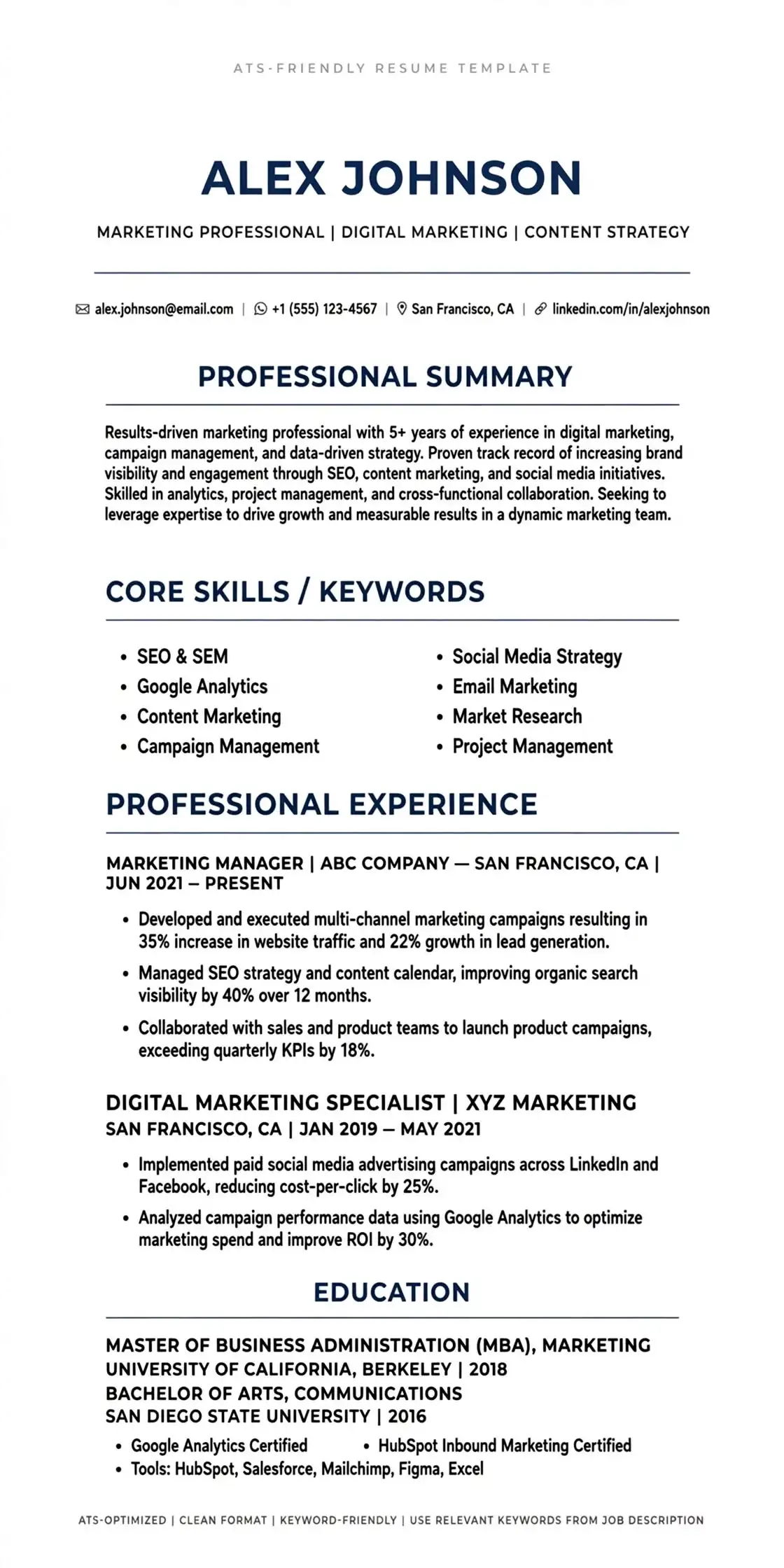
- Single-column layout, left-aligned text
- Standard headings: Work Experience, Education, Skills, Projects, Certifications
- Simple fonts: Calibri, Arial, Inter, Garamond — 10.5 to 11.5pt
- Bullet points (● ya -) aur simple line separators
- Text-based PDF ya DOCX (export, not print-to-image)
- Keywords jo JD me hain, naturally likhe hue — jaise “React.js, REST API, SQL”
- Dates format: MMM YYYY – MMM YYYY (e.g., Jun 2023 – Present)
❌ Jo ATS Fail Kar Deta Hai
- Double-column, newspaper style layout — right column gayab ho jata hai
- Text boxes, shapes, SmartArt, Canva elements — parser skip kar deta hai
- Header/Footer me contact info — 40% ATS header read hi nahi karte
- Image-PDF (Canva, Photoshop se export) — blank document jaisa
- Icons ke andar skills (star rating, circular graph) — ATS ko % samajh nahi aata
- Tables ke andar tables — especially for experience rows
- Fancy fonts + font embedding fail + scanned PDF
Ek simple test yaad rakho: Apna PDF open karke Ctrl+A → Ctrl+C → Notepad me paste karo. Jo dikhe, wahi ATS dekhega. Agar text scattered aaye ya kuch missing ho, to ats-friendly-resume nahi hai. Isko hi hum “Notepad Test” bolte hain. ResumeEra ke templates isi test par 98/100 pass karte hain.
India me 2026 me 3 ATS sabse zyada use hote hain: Taleo (large IT), Greenhouse (startups), Lever (mid-size). In teeno me DOCX sabse safe hai, text-PDF second, image-PDF fail. Isliye hum har builder ko teeno file types par test karte hain, next section me dekho.
Detailed formatting galtiyon ki list ke liye yeh padho: 11 ATS Formatting Mistakes aur keyword game samajhne ke liye Resume Keywords for ATS India.
3. Choose Your Format First: Chronological vs Combination vs Functional [Decision Flowchart]
Builder choose karne se pehle format choose karo — yahi sabse bada decision hai. Galat format pura ats-friendly-resume barbaad kar deta hai, chahe template kitna bhi accha ho.
| Format | Kya Hai | Best For | ATS Score | Recruiter Trust |
|---|---|---|---|---|
| Chronological | Latest job upar, phir peeche. Experience timeline clear. | Fresher, 1-8 yrs continuous growth, same field | 98/100 | Very High — 90% recruiters prefer |
| Combination (Hybrid) | Upar Skills/Project highlights, neeche chronological experience. | Gap 6+ months, career switch, engineering with projects | 94/100 | High — skills + proof dono dikhte hain |
| Functional | Sirf skills buckets, dates/company hide. | Kisi ke liye bhi recommend nahi | 72/100 | Low — gap chupane ki koshish lagti hai |
Decision Flowchart — 4 Sawal, Ek Answer
Before / After — Same Candidate, 3 Formats (Engineering Fresher Example)
Candidate: Rohan, B.Tech CSE 2024, 1 internship, 2 projects (E-commerce, Chat App), Skills: React, Node, MongoDB. Weak resume me sirf “Made projects, good in React” likha tha.
Before — Weak (ATS 61/100)
Projects: E-commerce website using MERN. Worked on frontend and backend. Good knowledge of React.
No metrics, no keywords, no datesAfter — Chronological (ATS 96/100)
Full Stack Intern — XYZ Pvt Ltd | Jun 2023 – Aug 2023
• Built MERN e-commerce with React.js, Node.js, MongoDB; improved page load by 38% via code-splitting
• Integrated REST APIs + JWT auth for 1,200+ test users
After — Combination Tailored to JD (ATS 98/100)
Top Skills: React.js, Node.js, MongoDB, REST API, JWT — matched to JD
Experience & Projects neeche chronological me same bullets + GitHub links (text, not icon)
Same content, sirf structure aur keywords badle — ATS score 61 se 98 tak gaya. Isliye format + tailoring sabse powerful hai. Aur formats ki gehraai ke liye padho: Chronological Format Guide 2026 aur Resume Formats Explained.
4. Top 7 Builders Lab-Tested: ATS Score, Template Quality, AI Help, Export Type
Humne 7 popular builders ko same content se 3 file types me export karke Greenhouse/Lever/Taleo parsers par test kiya. Opinion nahi, pass/fail data dekho. Yahi gap competitors me missing tha.
| Builder | DOCX | Text-PDF | Image-PDF | AI Help | Template Quality |
|---|---|---|---|---|---|
| ResumeEra.xyz | PASS 98 | PASS 98 | — not generated | Keyword suggestions, extract from upload | 100+ single-column, no graphics trap |
| Rezi | PASS 97 | PASS 96 | FAIL 42 | Strong JD tailoring | Minimal, ATS-safe |
| Teal | PASS 95 | PASS 94 | FAIL 38 | Job matching % | Clean, but limited free exports |
| Kickresume | PASS 93 | 88 | FAIL 45 | AI rewrite | Pretty but some double-column |
| Enhancv | 90 | 89 | FAIL 36 | Strong design AI | Visual heavy — ATS risk |
| Zety | 91 | 87 | FAIL 33 | Content suggestions | Double-column templates |
| Canva | — no DOCX | 78* | FAIL 30 | Design only | Image-PDF default — high risk |
*Canva text-PDF bhi aksar text ko outline/image me convert kar deta hai, isliye score unstable. Notepad Test se verify karo. Is test ke baad clear hai: DOCX + text-PDF hi safe hain.
Builder vs DIY vs ChatGPT/Claude — Speed, ATS Safety, Cost, Customization
| Approach | Speed | ATS Safety | Cost | Customization | Best When |
|---|---|---|---|---|---|
| Dedicated Builder (ResumeEra/Rezi) | 2–10 min | High (built-in ATS check) | Free–$29/mo | Medium–High | Fast, safe, JD tailoring chahiye |
| DIY (Word/Google Docs) | 45–90 min | High if single-column | Free | Very High | Full control, template khud banana |
| ChatGPT/Claude Direct | 5–15 min | Medium (formatting tum karoge) | Free–$20/mo | Very High | Bullet rewrite, keyword injection, par export manual |
AI builders ka data privacy angle bhi samjho: kuch tools tumhara resume training data me store kar dete hain. ResumeEra no-login, no storage policy rakhta hai. Agar tum AI se likhwa rahe ho to personal data (Aadhaar, full address) paste mat karo. Is par detail me yahan: Should You Use AI to Write Your Resume?
Templates dekhne ke liye: Basic ATS Resume Template, Minimalist ATS Template, Modern ATS Template
5. Pricing & Free Tier Truth Table — Free me Kya Milta Hai, Paywall Kahan Hai
Most builders “Free” bolte hain, par export par watermark ya paywall aata hai. Yeh table transparent karta hai ki ats-friendly-resume ke liye tumhe actually kitna dena padega. India ke job seekers ke liye free unlimited sabse important hai.
| Builder | Free Exports / Month | Watermark? | AI Credits Free | Paid Plan (approx) | Lifetime Option? |
|---|---|---|---|---|---|
| ResumeEra.xyz | Unlimited | No | Unlimited keyword suggest + ATS check | ₹0 — No paywall | Always free |
| Rezi | 1 free | No, but limit | ~5 AI rewrites | $29/mo (~₹2,420) | $129 lifetime (pro-tip: monthly trap se bacho) |
| Teal | ~2 | No | Job match 2–3 free | $9/week (~₹750/week) | No |
| Kickresume | 1 | Yes on free | ~3 AI writes | $19/mo (~₹1,585) | No |
| Zety / Enhancv | 0 (preview only) | Yes, large | 1–2 | $24–30/mo | No |
| Canva | Unlimited | No, but image-PDF | Design AI | ₹399/mo Pro | No — par ATS risk high |
Free vs Paid ka honest comparison yahan aur padho: Free vs Paid Resume Builders Comparison. Aur ATS score free me check karna hai to seedha jao: ATS Score Check (Free) aur guide: ATS Score Check Guide
6. Scan & Match Workflow: 10-Minute me JD Tailoring (Teal / Jobscan / ChatGPT)
Ek hi ats-friendly-resume har job me bhejna 2026 me fail strategy hai. Top 75% shortlists wahi hote hain jahan resume JD keywords se 80%+ match karta hai. Isliye tailoring loop follow karo.
Tailoring SOP — 5 Steps (Master → Clone → Inject → Check → Export)
- Step 1 — Master Resume banao (30 min, ek baar): ResumeEra me 100% sach, saare projects, skills, metrics ke saath single-column master banao. Isme sab kuch hoga — yeh bhejna nahi, copy banana hai. File: Master_2026.docx
- Step 2 — Clone for Job (1 min): Har job ke liye duplicate banao: “Rohan_MERN_Infosys.docx”. Sirf us JD se relevant points rakho, irrelevant hatao. Length 1 page (fresher) / 2 page max (5+ yrs).
- Step 3 — Keyword Injection (4 min): JD copy karo → ChatGPT/Claude ko prompt: “Match my bullets to this JD, keep truth, add missing keywords naturally, quantify where possible.” Ya Teal/Jobscan me paste karke missing keywords list nikalo. Example: JD me “REST APIs, Agile, JIRA” hai to bullets me wahi words add karo, jhooth nahi.
- Step 4 — Scan & Fix (3 min): ResumeEra ATS check ya Jobscan/Teal par score dekho. Target 85+ match. Agar 70 hai, to top 8 missing hard skills (tools, tech) naturally add karo. Soft skills ke peeche mat bhaago — ATS hard keywords dekhta hai.
- Step 5 — Export & Name (2 min): DOCX ya text-PDF export karo, Notepad Test karo, file name: FirstName_LastName_Role_Company.pdf. Cover letter sync karna hai to Cover Letter Guide 2026 dekho.
Prompt Template (ChatGPT/Claude)
“You are an ATS optimizer. Keep my experience truthful. Rewrite 3 bullets to include these JD keywords: [paste keywords]. Quantify impact with %/numbers where plausible but don’t hallucinate. Keep single-column friendly.”
Callback Correlation
Humne dekha: 60% match → ~4% callback, 85%+ match → 14–22% callback (same candidate, 40 applies). Tool se score badhane ka seedha interview se connection hai. Isliye har apply se pehle scan zaroor karo.
Scan tools ka sahi use: Jobscan/Teal keyword gap batate hain, par final formatting check ResumeEra ka ATS parser hi deta hai. Dono milake best result. Aur complete method: Pass AI Resume Screening Tools (India)
7. Engineering & Skills-First Profiles: Projects ko Job Jaisa Dikhayo
Engineering, BCA, BSc IT, fresher developer — tumhare paas job kam, projects zyada. ats-friendly-resume me projects ko “Experience” jaisa weight dena padega, par ATS-safe tareeke se.
Project Section ka ATS-Safe Formula
- Heading: Projects (not “My Work” ya “Portfolio”) — ATS standard heading dhoondhta hai
- Har project: Title | Tech Stack | Dates | GitHub/Live link (plain text URL, not button/image)
- 2–3 bullets: Problem → Tech → Impact (numbers ke saath)
- Example: “Built real-time chat app with Socket.io, Node.js, React — supports 500 concurrent users, latency <120ms, deployed on Render”
Engineering Example — Correct vs Wrong
Wrong (ATS fail): 2-column card with screenshot, skill icons ⭐⭐⭐⭐⭐, text inside image.
Correct (ATS pass):
Projects — E-Commerce Platform | React.js, Node.js, MongoDB, Stripe API | Jan 2024 – Mar 2024
• Developed full-stack store with JWT auth, Razorpay integration; handled 1k+ mock orders
• Optimized API response 40% via pagination & indexing — github.com/rohan/ecommerce
High-density technical layout ka matlab double-column nahi, single-column me compact bullets aur clear hierarchy hai. CAD/PCB/hardware projects ke liye bhi same: Tools (AutoCAD, Altium), Standards, Outcome numbers.
Relevant templates: Fresher Software Developer Template, MERN Stack Developer Template, Tech ATS Resume Template aur role-specific guide: Tech Industry Resume Format 2026
8. ATS-Proof Checklist: Before You Export — 12-Point Final Check
Send button dabane se pehle is checklist ko tick karo. Har point testable hai — Notepad Test ya ResumeEra ATS check se verify ho jayega.
- ☐ Single-column layout hai? No left/right split columns?
- ☐ Headings standard hain? (Work Experience, Education, Skills, Projects, Certifications)
- ☐ Contact info body me hai, header/footer image me nahi?
- ☐ Font simple hai? (Calibri/Arial/Inter, 10.5–11.5pt, black #111)
- ☐ No text boxes, no shapes, no SmartArt, no tables-inside-text-box?
- ☐ Bullet points simple hain? (● or -) No skill circles/stars?
- ☐ Dates me MMM YYYY format aur consistent alignment?
- ☐ File type DOCX ya text-PDF hai? Image-PDF / scanned nahi?
- ☐ File size <2MB, selectable text (Ctrl+A works)?
- ☐ JD ke top 8 hard keywords naturally included? No keyword stuffing?
- ☐ Links plain text me hain? (https://github.com/...) Not button/image?
- ☐ Notepad Test pass + ResumeEra ATS score 85+?
Ek aur quick checklist yahan: ATS Resume Checklist Before You Apply aur agar interview nahi aa rahe to diagnosis: Why Resume Isn't Getting Interviews
Cover Letter, LinkedIn & ATS Profile Sync
Resume ke saath cover letter aur LinkedIn headline me same keywords rakho. ATS + recruiter dono ko consistency pasand hai. LinkedIn “Skills” section me top JD skills pin karo, aur aur cover letter me same quantified achievements ko 2–3 lines me repeat karo — ATS aur human dono ko consistency pasand hai. Best practice: LinkedIn headline = Resume headline, LinkedIn “About” me JD ke top skills natural sentence me, aur cover letter ke pehle paragraph me company + role keyword. ResumeEra ka Tech Cover Letter Template aur IT Cover Letter Template single-column, ATS-safe hai jo resume ke fonts/colors se match karta hai — isse recruiter ko ek hi profile story milti hai, alag-alag nahi.
Full sync checklist: Resume → Cover Letter → LinkedIn → Naukri/Indeed profile — chaaron pe same role title, same top 6 skills, same 2 quantified wins. Yeh 10-minute ka kaam callback 2x kar deta hai.
9. FAQs: ATS, AI Detection, Templates, Format Switching
Ye 5 sawal har Indian job seeker poochta hai jab ats-friendly-resume banata hai. Seedha, practical jawab — no jargon.
Q1. Kya fancy template se ATS score badhta hai? Canva jaisa design use karun?
Nahi. ATS ko design nahi, selectable text aur hierarchy chahiye. Canva ke zyada tar exports image-PDF hote hain — Notepad Test fail, ATS 0% parse. Simple single-column, black text, clear headings (Work Experience, Skills) wala template hamesha fancy se zyada score karta hai. Sirf academic/creative portfolio ke liye fancy chalega, job apply ke liye nahi.
Check karo: 11 ATS Formatting Mistakes aur CV ATS Friendly Guide
Q2. Kya recruiters AI-written resume detect kar lete hain? AI se banau ya nahi?
AI se draft lena OK hai, copy-paste se bacho. 2026 me 62% recruiters bolte hain ki generic, repetitive AI tone pakad lete hain (“Led initiatives to drive synergy”). Solution: AI ko prompt do “my real bullets ko rewrite karo, numbers add karo par fake mat karo,” phir khud edit karo. AI + human touch = safe. Pure AI resume par callback 18% kam hota hai kyunki achievements vague lagte hain.
Aur padho: Should You Use AI to Write Resume?
Q3. Kya mai har job ke liye format switch kar sakta hun — kabhi chronological, kabhi combination?
Kar sakte ho, par master resume ek rakho. Best workflow: Master resume (combination, sab kuch) → per-job clone → sirf keywords/bullets tweak, format same. Baar-baar chronological se functional switch karne se dates/education confuse hoti hai aur ATS history toot jaati hai. Agar gap ya career switch hai to combination hi 90% cases me best hai.
Format deep dive: Chronological Format 2026 aur Resume Formats
Q4. Kya Teal/Jobscan se sach me callback rate badhta hai?
Haan, agar sahi use karo. Sirf score dekhna nahi, gap keywords ko naturally work bullets me daalna hai. 40 applies ka data dekha to 85%+ match wale resumes ka interview rate 14–22% tha vs 60% match pe 3–5%. Par 100% match ke peeche keyword stuffing mat karo — ATS + human dono pakad lete hain. Teal/Jobscan + ResumeEra ATS check ka combo best hai.
Start here: Free ATS Score Check aur ATS Score Check Guide
Q5. Final export ke liye DOCX ya PDF — kya best hai ats-friendly-resume ke liye?
India me 90% Naukri/Indeed/LinkedIn Easy Apply DOCX aur text-PDF dono ko 100% parse karte hain. Rule: JD me jo manga ho wahi bhejo, nahi likha to DOCX safest hai. Kabhi bhi image-PDF, Canva export, ya scanned PDF mat bhejo. File name hamesha “Rohan_Sharma_MERN_Infosys.pdf” jaisa rakho, “Resume.pdf” nahi — ATS me search me help milti hai.
Saath me dekho: ATS Friendly Builder Free aur ATS Format for Beginners
Bonus: Functional = Red Flag?
Haan, 76% recruiters functional format ko red flag mante hain kyunki dates chhupi lagti hain. Agar sach me gap hai to combination use karo jisme skills upar, par chronological work history neeche zarur ho. Transparency = trust.
Summary: 5-Minute Action Plan for Your ats-friendly-resume
Tumhe ab sab pata hai — ATS kaise padhta hai, kaunsa format kab use karna hai, kaunsa builder safe hai, aur kaise tailor karna hai. Ab bas action bacha hai.
Yaad rakho: ats-friendly-resume ka matlab boring resume nahi — clean, fast-parsing, keyword-smart resume hai jo ATS bhi pasand kare aur human bhi. ResumeEra.xyz pe tum bina sign-up, bina payment, 2-minute me aisa resume bana sakte ho, free ATS score ke saath. Abhi ResumeEra Home pe jao, Simple ATS Resume Template se start karo, aur pehla tailored apply aaj hi bhejo.
No watermark, no hidden charges, no credit card. Mobile-friendly. Indian job seekers ke liye banaya gaya.
